Shifts, the Z-report and printing 80 and 58 mm receipts
A cash register of the ua_prro app works in shifts: a cashier opens a shift, fiscalizes invoices in it and closes it with a Z-report. This article follows one such day and then shows how receipts and the Z-report are printed. Receipts are produced by a simulator of the fiscal server; they are not registered with the tax service.
A shift day
The cashier opens the PRRO Cash Register and presses "Open Shift". The app sends the simulator the document that opens the shift, and when the answer is accepted the shift becomes Open. A user who is an enabled cashier of the company does it.
A register cannot have two shifts at once, and a cashier cannot have two open shifts. When the server says the shift is already open, the app takes it as open and records it.
A shift passes four states:
| State | Meaning |
|---|---|
| Draft | the shift is made, it waits for the answer |
| Open | invoices can be fiscalized in it |
| Z Done | the Z-report is accepted; the closing document remains to be sent. This is the recovery point of the closing |
| Closed | the shift is finished |
During the day the cashier fiscalizes invoices in the open shift, each with its own document.
Fiscalizing in a shift follows the same steps every time: an invoice with Include Payment (POS), one payment row and the flag "Fiscalize (PRRO)" is submitted, and the cashier presses "Fiscalize". The cashier must be an enabled cashier of the company, may submit the invoice and has an open shift. A new attempt for an invoice with an unfinished document is accepted after a PRRO Manager resolves that document.
Closing the shift and the Z-report
At the end of the day the cashier opens the PRRO Shift, presses "Close Shift" and confirms "Send the Z-report and close the shift?". The app takes the totals of the shift, creates the Z-report and sends the closing document (101): one action with two documents. When the Z-report is accepted, the shift becomes Z Done, and when the closing document is accepted, it becomes Closed.
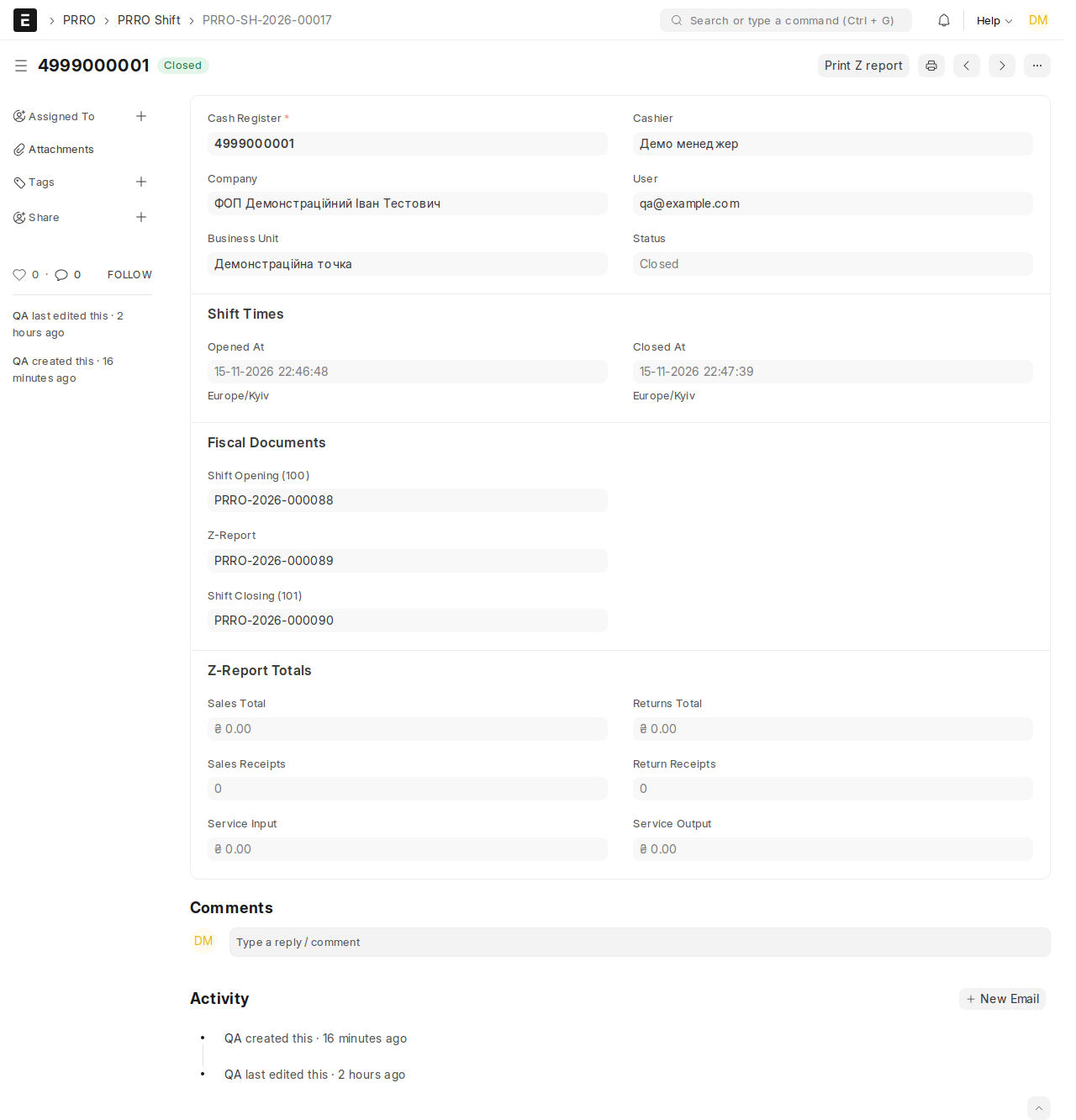
The Z-report holds the sums of the sales and of the returns (as the server counted them, after the rounding), the number of receipts, the payment forms and the taxes, the service input and output, and the cash at the end of the shift.
A closing can be refused:
- a document is in progress, and it has to be resolved before the closing;
- a receipt was registered while the Z-report was prepared, and the shift has to be closed again;
- the server did not give the totals of the shift: a Z-report without them is allowed only for a shift without receipts;
- the shift belongs to another cashier: its owner closes it. A register has one current shift, so a new one can be opened after this one is closed.
The state Z Done is the recovery point of the closing. When the closing document could not be sent, the shift stays in this state, and a repeated "Close Shift" sends only the closing document and does not create a second Z-report; when the outcome is unknown, the document is resolved first. The cash receipt order of the shift takings depends on this state as well: an accepted Z-report creates it (PRRO shift takings to the cash desk).
The simulator keeps its state in the cache of the site: after the cache is cleared it has lost the documents of an open shift, and the Z-report of that shift carries the totals of the simulator, without the receipts from before the loss. A manager presses "Sync with the Fiscal Server" after such a clear. The totals of an open shift without closing it are shown by the X-report.
Printing receipts and the Z-report
An accepted PRRO Document with a known fiscal number can be printed. The documents that open and close a shift are not printed. The buttons are "Print receipt 80 mm", "Print receipt 58 mm" and "PDF" on an accepted document, and "Print Z report" on the shift and on a Z-report document.
The main path is printing from the browser: the cashier chooses the receipt printer and its paper in the print dialog and allows pop-ups for the site. The PDF has fixed pages of 80 x 297 or 58 x 297 mm without margins, a longer receipt continues on the next page, and the PDF is not stored on the site. A line of the 80 mm receipt holds 42 characters, a line of the 58 mm receipt 32.
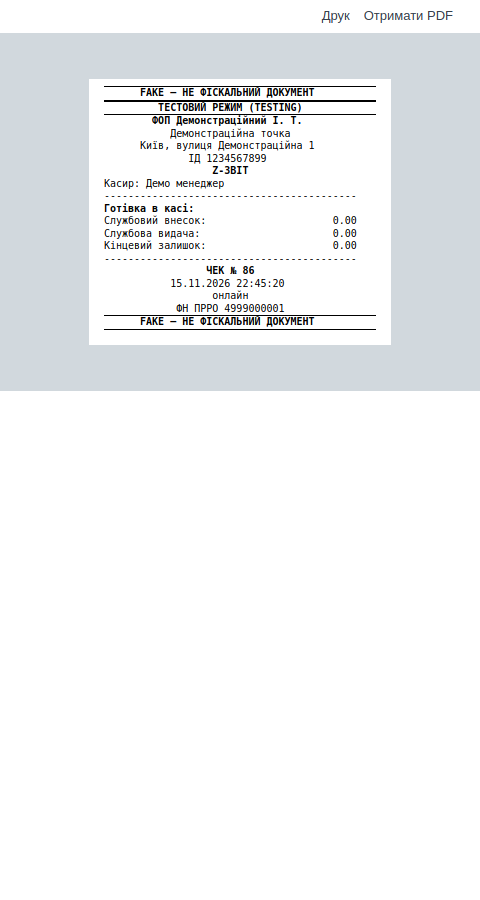
The Z-report is printed in Ukrainian.
The printed texts are fixed Ukrainian texts.
FAKE and TESTING on paper
A document signed by the stub is printed with the banner "FAKE — НЕ ФІСКАЛЬНИЙ ДОКУМЕНТ" at the top, and a box "QR — FAKE" stands where the QR code would be. A register in the testing mode adds "ТЕСТОВИЙ РЕЖИМ (TESTING)".
What this means
The whole day of a cashier, from the opening of a shift to the printed Z-report, runs in the app: the shift, the receipts, the closing with the Z-report and the closing document, and the printing of 80 and 58 mm receipts and the Z-report. The state Z Done gives the closing a recovery point.
More in the documentation: Close a shift and the Z-report and Print receipts and the Z-report.