POS Next and the PRRO in ERP-CRM: automatic fiscalization
ua_prro is an ERPNext app for the Ukrainian software cash register (PRRO). This article describes how it works with POS Next, the till screen for sales. Receipts are produced by a simulator of the fiscal server; they are not registered with the tax service.
Why it exists
Until now a receipt was made from a Sales Invoice: the cashier submitted the invoice and pressed "Fiscalize". In POS Next a sale is submitted in one move on the payment screen, and a separate button on the invoice was an extra step that is easy to miss. Now a POS Profile can turn on automatic fiscalization: a sale or a return in POS Next goes to the fiscal server at once.
How it is turned on
A POS Profile has a section "PRRO (Ukraine)" with two fields: "Fiscalize POS Next Sales Automatically" and "PRRO Cash Register". The option is off by default and applies to that profile only: a profile without it works as before, with the button "Fiscalize" on the invoice. Turning the option off brings that mode back.
For a sale to pass, the user must be listed in the profile, must have a PRRO Cashier record in the company of the profile and must have an open PRRO shift on the register of the profile. The POS Next shift and the PRRO shift are two separate shifts. Without a PRRO shift the sale is refused before any invoice is made, with the message "Open a PRRO shift of cash register ... first".
What the cashier sees
For cash the payment dialog shows a line "Cash total (rounded to 0.10)" under the grand total and computes the change from it: 20.00 paid for a sale of 12.35 gives a change of 7.60. After the sale (the dialog itself shows the fiscal outcome of a sale) the sale-complete dialog shows "Change to hand over" in large figures, the receipt total, the fiscal number and the status; a test receipt carries the mark "Test receipt".
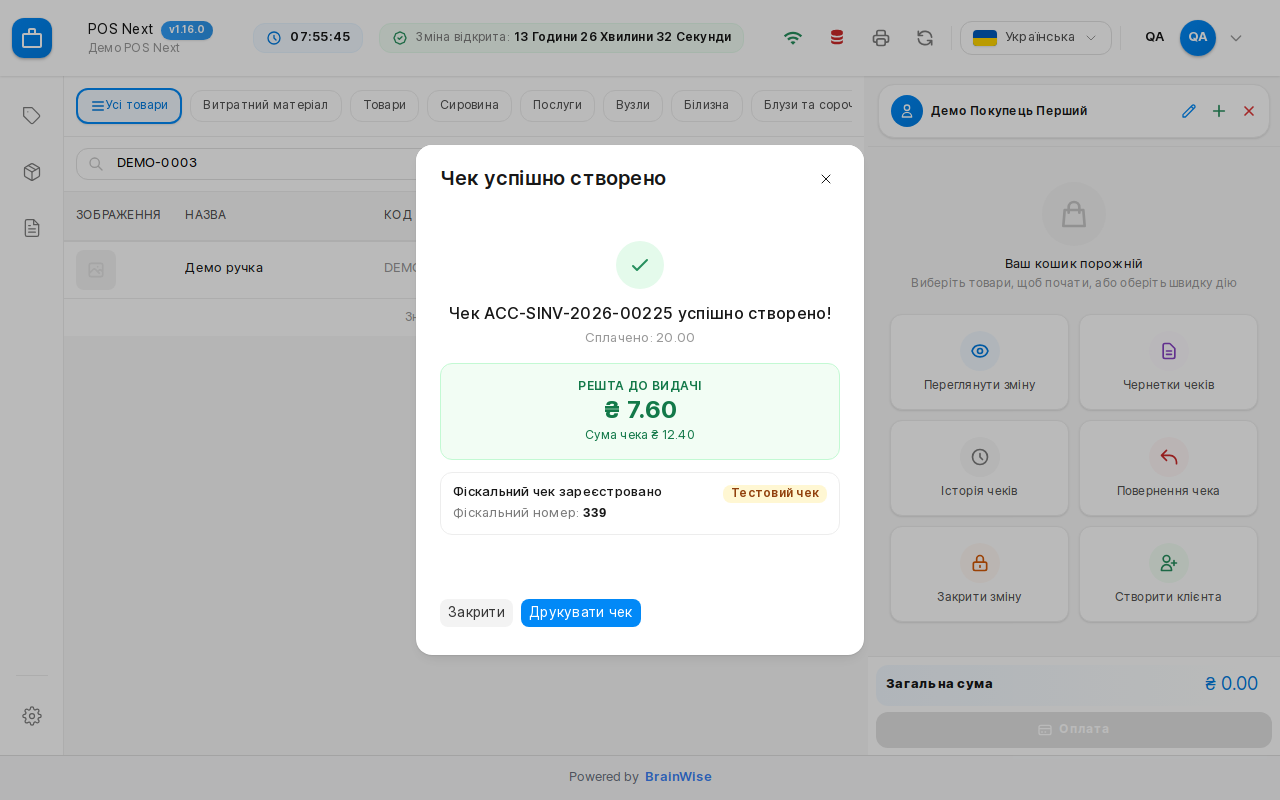
A failure of the fiscal step does not cancel the sale: it is already submitted, and a second sale would only make a duplicate. Instead the dialog shows a red panel "Fiscal receipt not registered" with the text of the error and a button "Fiscalize again". If the outcome is unknown (the answer of the server did not arrive), a PRRO Manager resolves the document. These texts are shown by POS Next with the ERP-CRM changes; without them the sale is fiscalized the same way, but the cashier sees only the sale.
How cash is rounded
The rule is the one of the Sales Invoice: a cash amount is rounded to 0.10 UAH (or 0.50 UAH when set so), and the amount of a card payment stays exact. In POS Next the main cart screen shows the exact total, and the payment dialog shows the rounded cash total. A sale of 12.35 reaches the receipt as 12.40. The cashier enters the rounded amount (the keypad adds amounts, so the previous one is cleared with "C"): the exact 12.35 leaves "Remaining 0.05" and the line "Accept 12.40 (cash total)", and "Complete payment" is disabled; a larger amount is accepted and the change is computed from the rounded total.
Returns
A return made in POS Next creates a return receipt by the rules the invoices already have: Returns and the return receipt. The return dialog of POS Next has a line "Cash to hand back (rounded to 0.10)", and the return receipt carries the same rounded amount: the customer is handed the amount of that line. If the sale that is returned has no receipt, the return is submitted without one, and the dialog says so. The return of a sale with a discount on the total is the whole sale with the same discount.
The report of unfiscalized invoices
A sale is submitted before it is sent to fiscalization. If the connection is lost between the two steps or the app is stopped, the invoice stays submitted and without a receipt. For this there is the report "Unfiscalized Flagged Invoices" in the PRRO workspace. An open PRRO shift shows an orange counter of such invoices, and the confirmation of the shift close repeats their number. The close goes with a warning: the Z-report covers only the sales that have a receipt. The button "Fiscalize" on the invoice fixes each one.
The discount on the total and the refusals
The discount on the total (an amount or a percentage) is distributed across the lines of the receipt in proportion to their amounts, in kopecks: every share is rounded down, and the missing kopecks go to the lines with the largest fractional parts. The discounts of the lines add up to the discount on the total. The app refuses a discount that is not below the total of the lines, a negative discount, a discount after which a line has nothing left to pay and a cash (non-trade) discount, which has a message of its own. Discounts on the rows are accepted too.
For a profile with the option the app also refuses a write-off, loyalty points, a wallet or credit payment, several modes of payment and a currency other than UAH.
- A card sale in POS Next passes with the default settings; the PAYSYS block of the receipt is filled when the terminal data are present.
- An invoice from the browser queue (the offline mode) is refused at sync, because its receipt would carry the time of the sync.
What this means
A sale and a return in POS Next run from the payment to the fiscal number, and a failure of the fiscal step is visible in the dialog and in the report. The discount on the total is distributed across the lines of the receipt, cash is rounded by the rule, and the amount of a card payment stays exact.
More in the documentation: Sell in POS Next and Unfiscalized flagged invoices.