Unfiscalized flagged invoices
Who it is for: a PRRO Cashier and a PRRO Manager. Result: you see the submitted sales that should have got a receipt and did not, and fix them before the shift is closed. Closing the shift: the warning goes with the close; the Z-report covers the sales that have a receipt.
Where such invoices come from
A POS Profile with automatic fiscalization (Sell in POS Next) first submits the invoice and then sends it to fiscalization. If the connection is lost between the two steps, a time-out occurs or the app is stopped, the invoice stays submitted, marked "Fiscalize (PRRO)" and without a PRRO Document. The report shows such sales.
The report
The report "Unfiscalized Flagged Invoices" is in the PRRO workspace. The roles PRRO Cashier, PRRO Manager and System Manager can open it. Filters: company, POS Profile, from date and to date. A cashier sees the companies of the own enabled cashier records, a PRRO Manager and a System Manager see all.
Columns: invoice, date, company, POS Profile, receipt kind, grand total, PRRO document, PRRO status, minutes since creation. A row holds these fields, so a cashier does not need the right to read invoices.
The report lists a submitted flagged invoice that has no document in progress (Draft, Signed, Sent, Unknown) and no Accepted one:
- an invoice without any document appears after one minute: the time of the request that is about to fiscalize it;
- an invoice with only Rejected or Failed documents is shown at once.
The counter on the shift
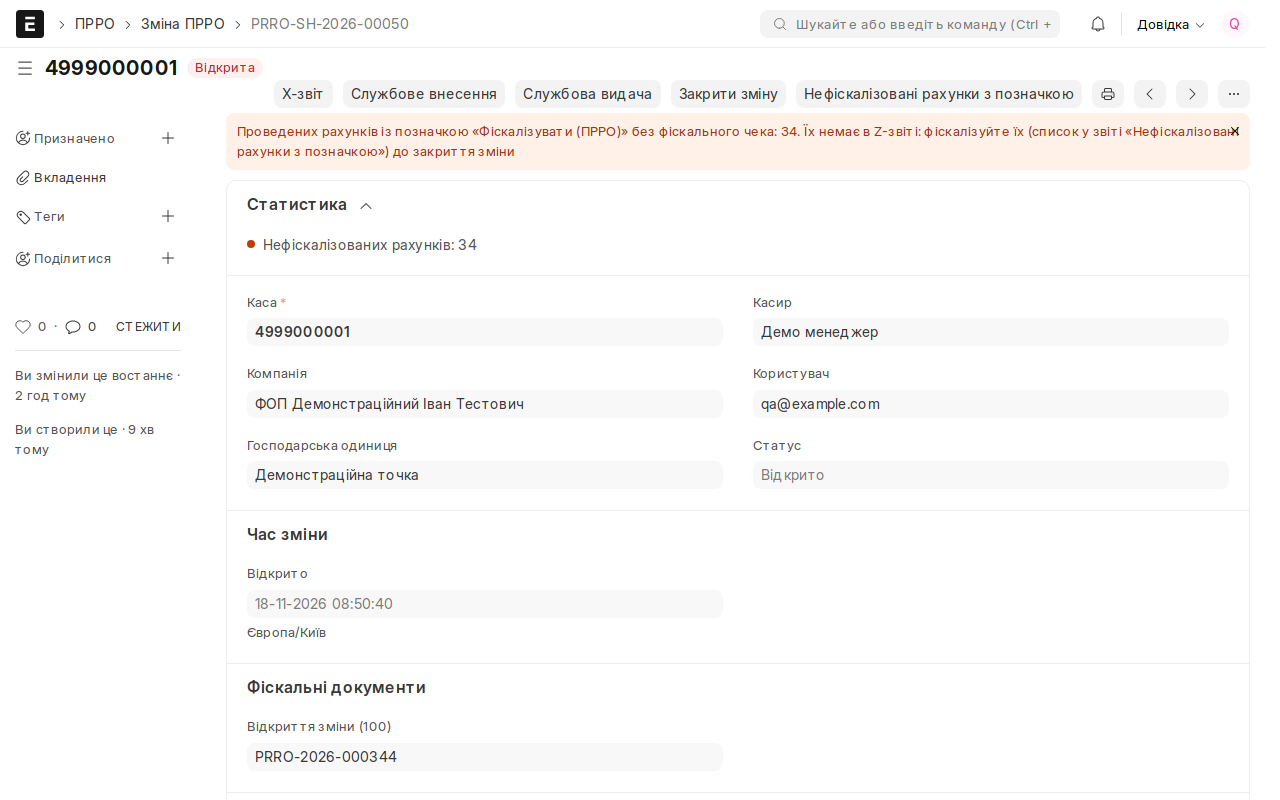 An example: the number 34 comes from old demo invoices of another profile.
The form of a PRRO Shift in the states Open and Z Done shows an orange indicator "Unfiscalized invoices: N" and a button that opens the report for the company of the shift. The counter is for the company of the shift, except the invoices of a POS Profile bound to another PRRO.
The warning at shift close
The confirmation of "Close Shift" repeats the warning in red text, and the answer of the close adds an orange message: "N submitted invoices marked Fiscalize (PRRO) have no fiscal receipt and are missing from the Z-report: fiscalize them ... before the shift is closed". The close goes with a warning: if the shift is closed, the Z-report covers only the sales that have a receipt.
What to do
- Open the report from the shift form or from the workspace.
- Open the invoice from the row and press "Fiscalize" (Fiscalize a Sales Invoice). The PRRO needs an open shift.
- An invoice with the status Unknown is not fixed by the button: a PRRO Manager resolves it (Resolve a document).
- When the receipt is accepted, the invoice leaves the report.
- Close the shift (Close a shift and the Z-report) only when the report is empty.
If an invoice cannot be fiscalized (for example, a pre-check refuses it), the causes are in the pre-check reference.