Business unit, PRRO and cashier
Who it is for: an administrator, a PRRO Manager. Result: a PRRO on which a cashier can open a shift.
PRRO Business Unit
This is a point of sale. Fill in:
- Unit Type from the list of 451 types of the tax service;
- Unit Name, printed on receipts as the name of the point of sale;
- Entity ID, the identifier of the taxation object in the register of the tax service;
- Address on Receipts (by default the registered address of the company);
- for sellers without VAT: the letter and the legend of "Goods without VAT".
Warning: the name and the address of the business unit must be written exactly as the register of the tax service has them, down to a space, a comma and an abbreviation. For example, if the register says "вул. Прикладна, 15, м. Київ", then "вул.Прикладна 15, Київ" is a different address. A mismatch may make the fiscal server refuse, and the shift cannot be opened. Take the name and the address from the register.
PRRO Cash Register
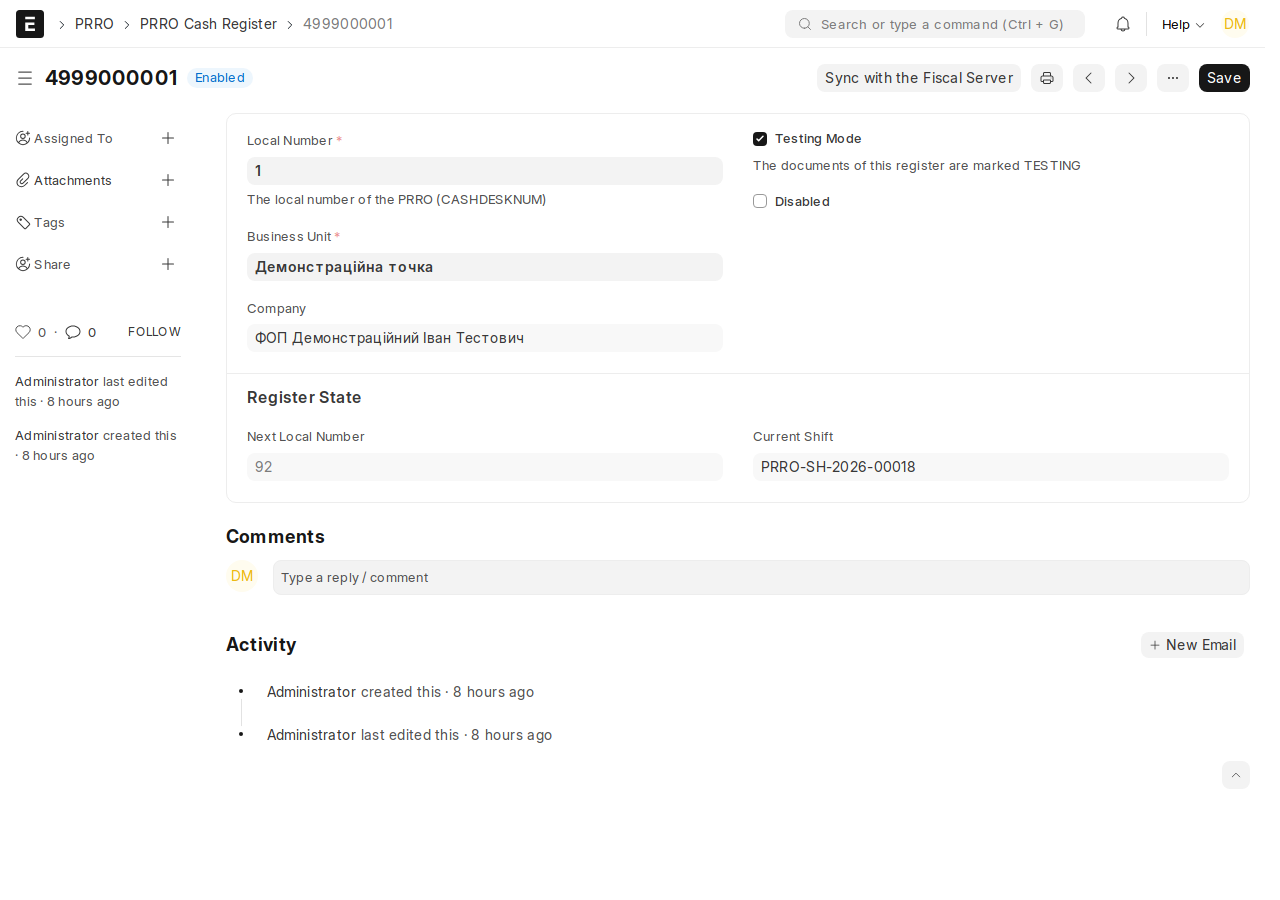
The PRRO is the software cash register that registers the receipts. The POS (the cash desk) is the workplace of the cashier, a separate object.
- Fiscal Number and Local Number of the PRRO;
- Business Unit;
- Testing Mode: the documents of the PRRO are marked as test ones;
- Register State, Next Local Number and Current Shift are filled by the services of the app, not by a user.
A PRRO is added when the company has the Default Cash Account; it is disabled after the shift is closed and the documents in progress are resolved.
POS Profile and the PRRO
The PRRO that fiscalizes the sales of POS Next is set in the POS Profile, in the section "PRRO (Ukraine)": the field "PRRO Cash Register" together with the option "Fiscalize POS Next Sales Automatically" (off by default). It must be an enabled PRRO of the same company as the profile. The cashier of a sale must be a user of the profile and must have an open PRRO shift on this very PRRO: Sell in POS Next.
PRRO Cashier
- a user and a company;
- Cashier Name, printed on receipts;
- Signer Key ID: a reference to the key in the signing service.
A user has at most one enabled cashier in a company.
Roles and the workspace
- PRRO Manager sets up, tests the connection and resolves documents. Syncing a register and resolving a document also need an enabled cashier record of the company.
- PRRO Cashier opens a shift and fiscalizes. A cashier sees only the own cashier record.
- The workspace "PRRO" gathers these records.
Next: Test connection and sync.