Trial balance (оборотно-сальдова відомість)
Who it is for: an accountant. Result: a trial balance for a period: the opening balance, the turnovers and the closing balance of every account, with one-sided balances.
Note: The final decision rests with the enterprise's accountant.
What it is
The report "UA Trial Balance" ("Оборотно-сальдова відомість") in the module "UA Documents" is a thin wrapper of the standard ERPNext Trial Balance. The sums, the opening balances with the closing entries of the periods, the filters and the permission checks are those of the standard report; the wrapper presents the result in the Ukrainian layout.
Users: Accounts User, Accounts Manager and Auditor.
Filters
Company, "Reporting year" (the fiscal year, required by the standard report), From Date, To Date, "Account and its subaccounts", "Cost centres", "Filter by projects", Finance Book, all Accounting Dimensions, "Show accounts without balance and turnover" and "Show the rows of account groups" (on by default). The API passes the other filters of the standard report (presentation currency, the unclosed fiscal year, the toggles of the period closing entries) to the standard report.
The period is limited to the fiscal year, as in the standard report; the printed layout shows the dates that the report actually used.
What the report shows
Columns: the code, the title, six amounts — the balance at the start (debit, credit), the turnover for the period (debit, credit), the balance at the end (debit, credit) — the nature of the account and a note.
- One balance per account. An account has one balance: debit or credit. The report asks the standard report for netted values.
- Group rows are the sum of the accounts under the group per column: the debit balances together, the credit balances together. The balance of subaccounts 63, 64, 65 and 68 may be debit or credit (Instruction to the chart of accounts), so a group is shown with two sums. The total row is the sum of the accounts.
- An account with an opening balance and no turnover stays in the report even without "Show accounts without balance and turnover"; that option adds accounts without an amount in the period and before it.
- The order of rows is the order of the chart tree; when it differs from the order of the numbers, the tree order is shown.
- The nature of the account. When the account has a required balance side ("Balance must be": Debit is active, Credit is passive), the report shows "Активний" or "Пасивний" and marks an opening or closing balance on the opposite side with the note "Сальдо на стороні, протилежній характеру рахунку". The chart of accounts of the app sets that field for some accounts; ERPNext refuses such a balance when an entry is posted.
- The debit and the credit totals of the opening balance, the turnover and the closing balance agree when the ledger is complete.
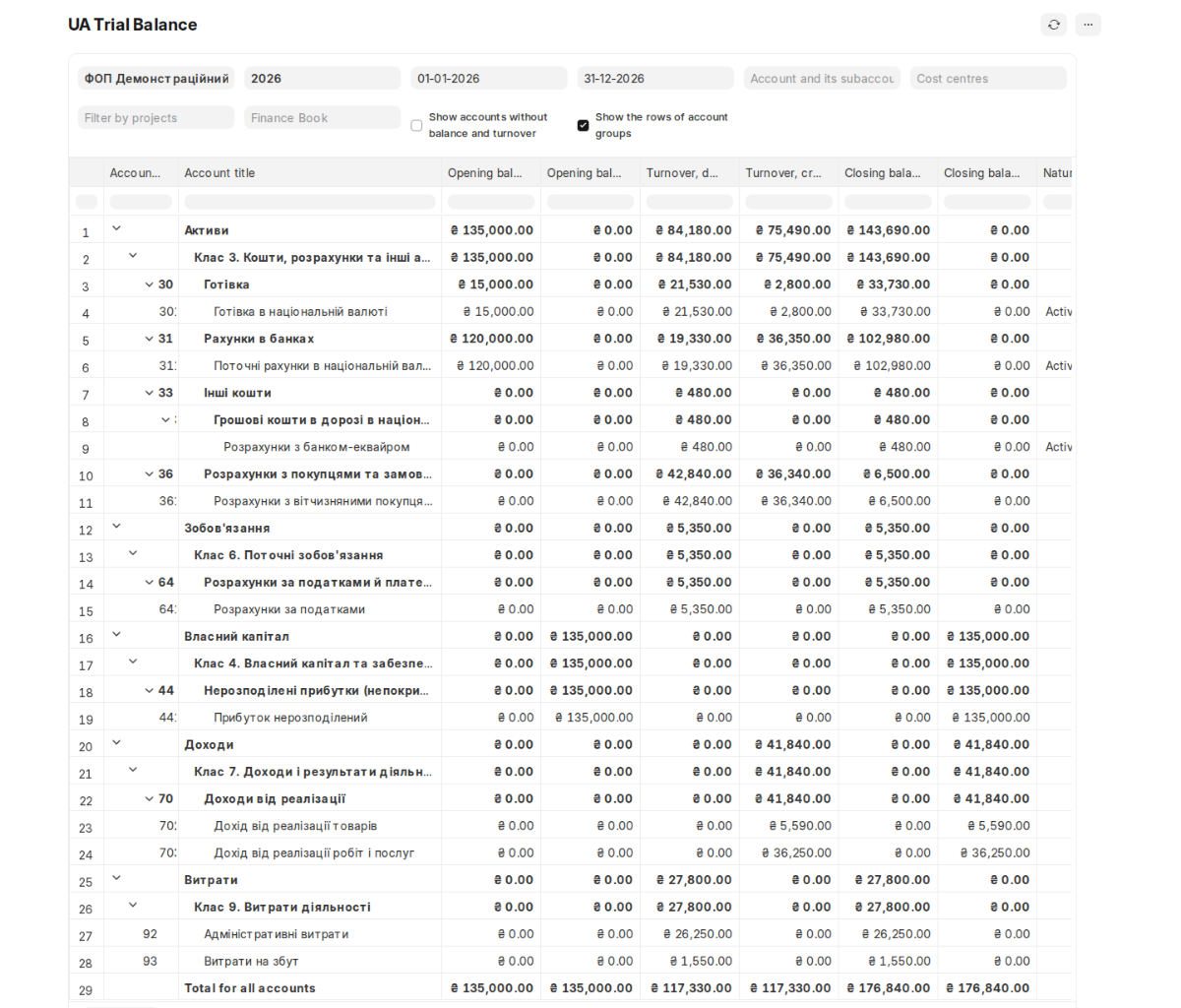
Print and export
- Print and PDF: a layout of its own with a two-line header: "Сальдо на початок періоду", "Обіг за період", "Сальдо на кінець періоду", each with "Дебет" and "Кредит". The text of the layout is Ukrainian (registers are kept in the state language).
- XLSX: the standard export: the same columns and rows as on the screen (the code, the title, six amounts, the nature, the note).
The standard report prints through the shared layout of financial reports: the account is one column "number - name" and the header is one row. This is why the trial balance has a layout of its own, with a two-line header and a note on the nature of the account.
Related: Chess sheet, main book, account card and other ledger reports, Cash book, Structure of the chart of accounts.