Payment invoice (рахунок на оплату)
Who it is for: a sales manager, an accountant. Result: a Ukrainian payment invoice (рахунок на оплату) is printed from a Sales Invoice or a Sales Order.
Note: The final decision rests with the enterprise's accountant.
How to print
- Open a Sales Invoice or a Sales Order.
- Choose "Print" and the format:
UA Payment Invoice("Рахунок на оплату") for a Sales Invoice;UA Payment Invoice for Order("Рахунок на оплату (замовлення)") for a Sales Order.
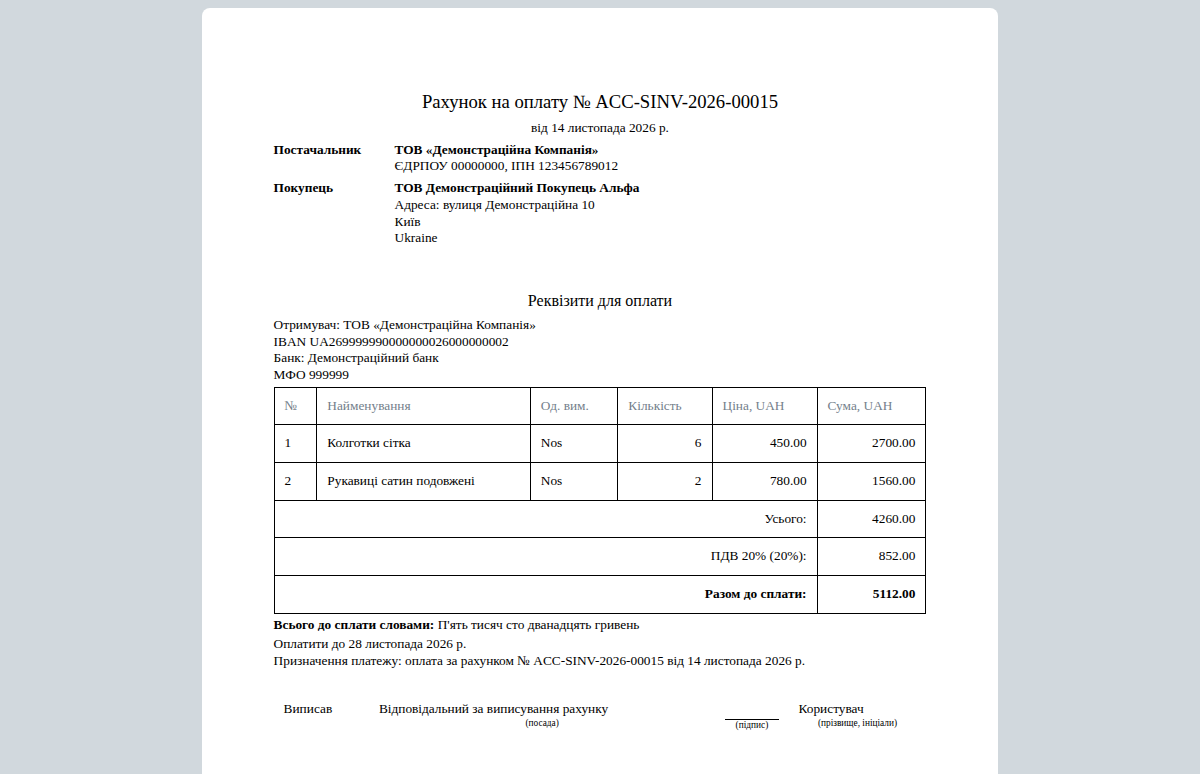
What kind of document it is
The payment invoice is printed with the requisites of the parties and the bank details. For shipments and services there are the delivery note and the act.
What is printed
- A title with the number (the name of the document from the naming series) and the date:
posting_datefor a Sales Invoice,transaction_datefor a Sales Order. - The supplier: the company name with its legal form, the codes (ЄДРПОУ and VAT number for a VAT payer) and the address. The codes are printed from the company requisites; when the company has no code, the
company_tax_idof the document is used. - The customer: the name and the tax ID from the document, else from the Customer record.
- The payment requisites of the supplier.
- The rows: name, unit, quantity, price, amount.
- The totals, the amount in words, the payment terms, the purpose of payment and one signature "Виписав" (the full name of the user who made the document,
owner).
Bank details
The app chooses a bank account of the company: the first enabled account of this company that has an IBAN or an account number and is in the currency of the document; when there is none, the main account of the company ("Main Bank Account"), then the default bank account of ERPNext, then the other accounts of the company. Printed: the recipient, the IBAN (or "Р/р"), the bank, the МФО and, for a document not in hryvnia, the SWIFT of the bank. When no account in the currency of the document exists and an account in another currency is chosen, the form prints a visible note.
VAT
VAT is printed at the level of the totals: "Усього", one line per tax row ("ПДВ (20%)"), "У тому числі …" when the tax is included in the price, and the discount and rounding when they are set. For a document without VAT the form prints "Без ПДВ". Other taxes with an amount (a customs fee) are printed as their own lines.
Amount in words and payment terms
- The amount in words comes from the rounded total when there is one, otherwise from the grand total, in the currency of the document. The amount in words is printed for about 150 ISO currency codes, among them UAH, USD, EUR, PLN, GBP, CHF, CZK, JPY; a currency outside this list is printed as figures with its code. A negative amount prints "мінус".
- Printed: the name of the payment terms template, "Оплатити до" (the due date of the invoice, else the last row of the payment schedule) and a table of the schedule when it has more than one row.
- The line "Рахунок дійсний до" is printed when the document has a
valid_tilldate; the field can be added by a customization. - The purpose of payment is printed as "оплата за рахунком № … від …".
Related: Delivery note, Taxpayer requisites.