Returns and the return receipt
Who it is for: a PRRO Cashier; a PRRO Manager normally enters the receipt number of an old sale. Result: an accepted PRRO Document of the kind Return (a return receipt) for a return invoice. Conditions: a return is made with a return invoice for an invoice with one payment row.
When a return receipt is made
A sale whose receipt was accepted is taken back with a return invoice. A return invoice with the flag "Fiscalize (PRRO)" is fiscalized with the same button "Fiscalize" as a sale. The app takes the fiscal number of the original receipt from the accepted document of the sale and writes it into the return receipt (ORDERRETNUM).
A full return of a cash sale
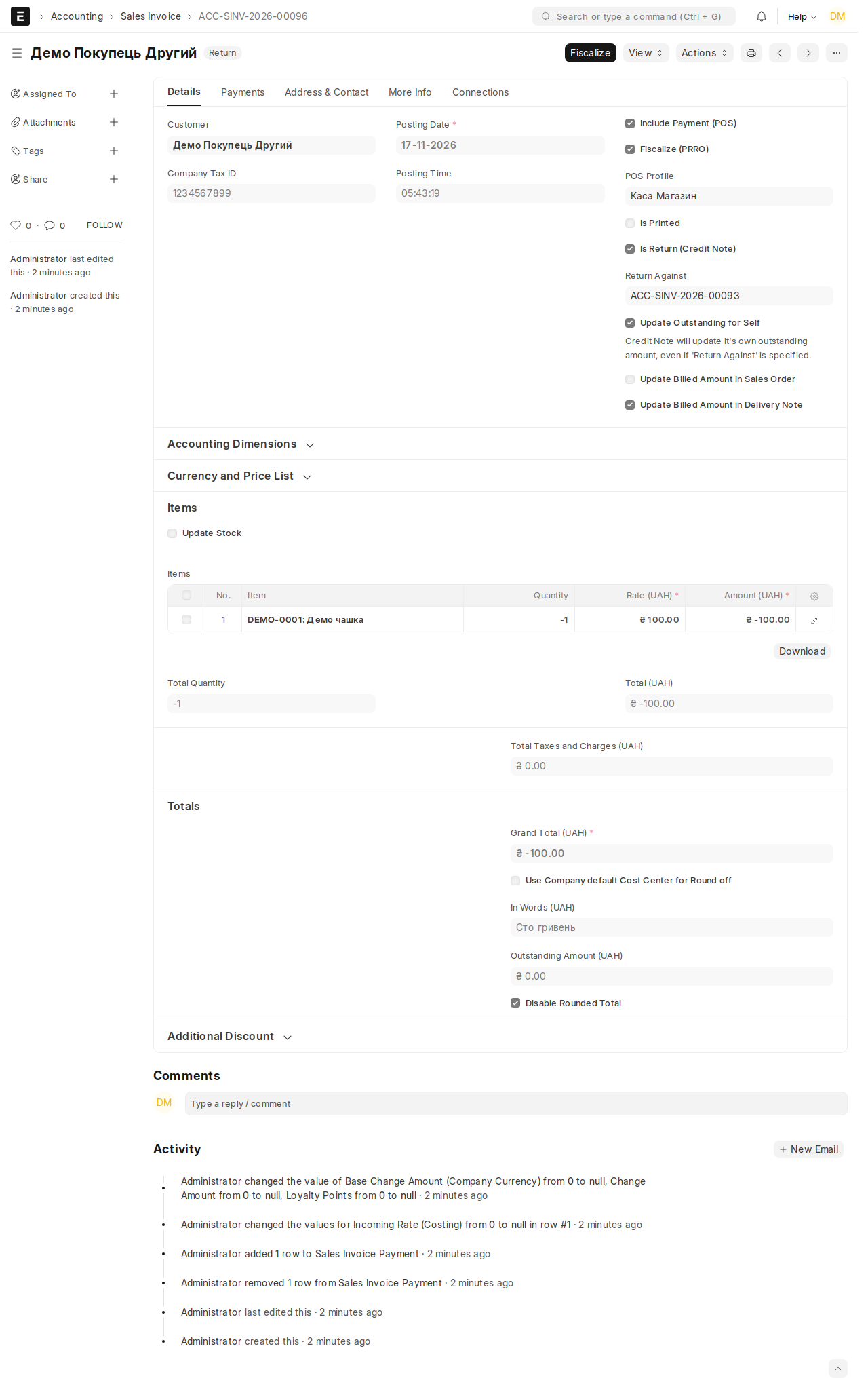
- Open the Sales Invoice whose receipt is accepted and make a return ("Make Return").
- Save the invoice. When the receipt of the original is accepted, for a POS invoice the flag "Fiscalize (PRRO)" is switched on by itself. When the cashier clears the flag, the sale stays registered without a return receipt.
- Submit the invoice.
- Press "Fiscalize". The cashier needs an open shift.
- Read "PRRO status" on the return invoice. The button "PRRO Document" opens the document of the kind Return, which is linked to the document of the sale.
Pressing "Fiscalize" a second time returns the same return receipt document. Two returns of one sale are handled one after the other.
A partial return
In a partial return keep only the rows and quantities that are returned. The return receipt holds exactly them. The app makes sure that the returned quantity of every item does not exceed what was sold minus the earlier returns whose receipts are accepted or still in progress. Otherwise it refuses: "Item X: N is returned, but only L of S is left to return".
Rounding and the payout
A cash return is rounded by the same rule as a sale: with the 0.10 step 12.35 UAH gives 12.40 (with the 0.50 step it would be 12.50), and the return receipt shows the amount as a positive number. The customer is paid back the rounded total from one cash row. The rule is on the page Cash rounding.
A card return
A card refund is a transaction of its own at the terminal, so the terminal data of the sale are not copied to the return invoice. The return receipt carries the amount of the card payment: the return invoice passes the same card checks as a sale (A card payment). The amount of a card payment stays exact.
A return from POS Next
A return made in POS Next with a profile that has automatic fiscalization creates a return receipt at once, by the same rules. The sale-complete dialog shows the outcome; the return dialog shows a line "Cash to hand back (rounded to 0.10)" (12.35 gives 12.40), and the return receipt carries the same rounded amount: hand the customer the amount of that line. For a sale made before the option was turned on, the dialog shows the message "The returned sale has no fiscal receipt here: this return is not fiscalized (a PRRO Manager makes it from the invoice if it must be)", and the status of the block is Skipped. More: Sell in POS Next.
A return of an old sale
For a returned invoice whose receipt was made before the move to ERP-CRM, the return invoice shows the field "Original receipt fiscal number". A PRRO Manager normally sees and fills it, in a draft return. The field holds the fiscal number of the sale receipt: the fiscal server issued it in its answer (ORDERTAXNUM), and in the return receipt it is written as ORDERRETNUM. The number is checked for format (letters, digits and the characters . _ / -). When the original has an accepted receipt, the field is cleared: the number is taken from the receipt. The bank RRN of a terminal transaction is a separate notion (Glossary).
A return with a discount on the total
ERPNext copies the whole discount of the sale into the return invoice. So the return of a sale with a discount on the total is the whole sale (every item in the sold quantity) with the same discount; the discount is distributed across the lines of the receipt as for a sale (Pre-checks of a flagged invoice). The app refuses a partial return of such a sale, a return that drops the discount of the sale and a return with a discount that the sale did not have. This holds for a discount in an amount and in a percentage.
What the app checks
A return passes the same checks as a sale, in absolute values (Pre-checks of a flagged invoice), and these:
| Message | Cause | What to do |
|---|---|---|
| The returned invoice X has no accepted fiscal receipt (the receipt C is S): there is no registered sale to return | the sale is not registered | a return without a receipt, or resolving the document of the sale |
| The receipt C of the returned invoice X is S: wait for its outcome (or resolve it) before the return | the receipt of the sale is not final | wait or resolve the document |
| The fiscal number of the receipt C of the returned invoice X is still pending: a PRRO Manager resolves the document first | the number of the sale is not final | a PRRO Manager resolves the document first |
| The returned invoice X has no PRRO Document here: a PRRO Manager enters the fiscal number of its receipt (Original receipt fiscal number) | the receipt was made before the move to ERP-CRM | a PRRO Manager enters the receipt number |
| Item X: N is returned, but only L of S is left to return | the quantity is too large | reduce the quantity |
| The returned invoice had a discount on the total: only the whole sale can be returned (every item in the sold quantity), because the discount of the sale cannot be shared out for a part | a partial return of a sale with a discount | return the whole sale |
| The returned invoice had a discount on the total: the return must keep that discount, or it refunds more than was paid | a return that drops the discount of the sale | keep the discount in the return |
| The returned invoice had no discount on the total: the return must have none either, or it refunds less than was paid | a return with a discount that the sale did not have | clear the discount |
| The total of a return must be negative | not a return invoice | check the invoice |
What to do with a status
A return receipt has the same statuses as any document (Statuses and what to do). An accepted return receipt stays registered; cancelling the return invoice goes with a warning (Cancel, delete and return).
Printing
A return receipt is printed from the accepted PRRO Document, like a sale receipt (Print receipts and the Z-report). Its title is "Видатковий чек (повернення)" and a line "Повернення за чеком №" with the number of the sale.
Return conditions
A return receipt is made for a return invoice with the flag "Fiscalize (PRRO)": the return of a POS invoice with one payment row.
Related: Fiscalize a Sales Invoice, Service deposit and withdrawal.