Act of works and services (акт виконаних робіт)
Who it is for: an accountant, a manager who invoices services. Result: an act of acceptance of works (services) is printed from a Sales Invoice whose rows are services.
Note: The final decision rests with the enterprise's accountant.
How to print
- Open a Sales Invoice with services.
- Choose "Print" and the format
UA Act of Works and Services.
The title in the form is "Акт здачі-приймання виконаних робіт (наданих послуг)". The act is printed from the same Sales Invoice, and the number of the act is the number of the invoice.
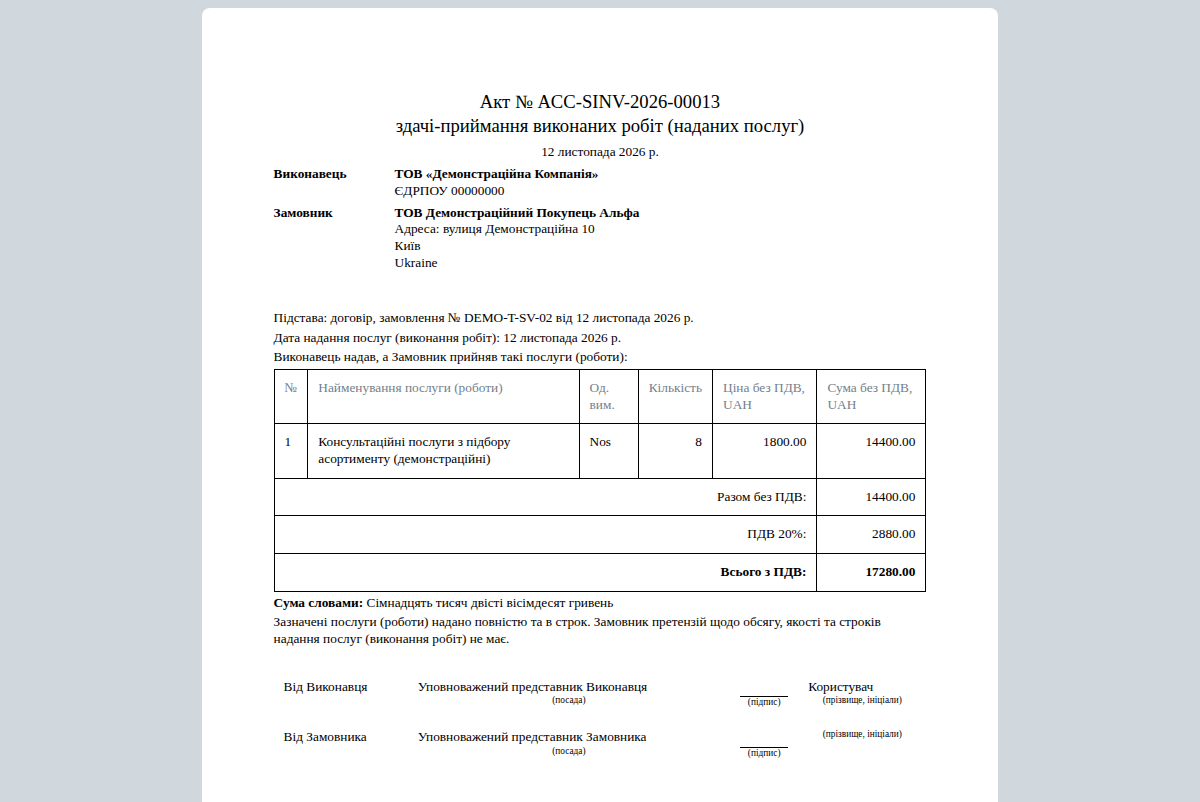
What is printed
| Part | Where it comes from |
|---|---|
| Title and number | a fixed title and the number of the invoice |
| Date | the posting date |
| Executor | the company name with its legal form, its code and address |
| Customer | the customer name, code and address |
| Basis | the customer's order or contract number and date (po_no, po_date) when set |
| Period of the services | from_date and to_date when set; otherwise "Дата надання послуг" with the date of the act |
| Rows | name, unit, quantity, price, amount |
| VAT | for a document with taxes: the amount without VAT, one line per tax row, the total with VAT; without taxes "Без ПДВ". VAT is counted per document, not per row, because a column per row would differ from the total by rounding |
| Total | the rounded total when there is one, otherwise the grand total; a line "Заокруглення" when it is not zero |
| Currency | the currency of the document in the headers and in the amount in words; for a foreign currency also a line with the rate and the hryvnia equivalent |
| Signatures | the executor: the full name of the user who made the document; the customer: the contact of the document; the positions are fixed |
The amount in words is printed for the currencies that have words (about 150 ISO codes); a currency outside this list is printed as figures with its code.
The customer signature switch
By default the act has both signatures and a sentence that the customer has no claims. The Sales Invoice has a check box "Customer signature omitted by contract" (ua_customer_signature_omitted), off by default. When it is on, the act carries the executor's signature block only, without the sentence about the customer's claims, and under the block it prints a record that the position, surname and signature of the customer's representative are not put on the act under the terms of the written contract (the number and date from po_no, po_date, otherwise an empty place for the contract details), with a reference to part 2 of article 9 of the Law on accounting.
The basis is the paragraph of part 2 of article 9 of the Law on accounting that was added by Law No. 4791-IX of 24.02.2026: when a primary document contains the date or the period of the provision of services, the performance of works or the lease, the absence of the positions, surnames and the personal signature on the side of the customer is not a violation if the written contract sets this procedure and the operations are shown in the books in the period in which they took place. It does not extend to operations paid from public funds, the lease of state or communal property, construction contracting, design and survey works and contracts of donation, charitable or humanitarian aid.
The check box stands in the Sales Invoice because the permission to omit a signature depends on the contract with that customer and on the kind of operation; the value is kept with the invoice.
Print details
- All rows of the Sales Invoice are printed in the act as services, goods rows included.
- The code line of the executor prints the ЄДРПОУ of the company.
Related: Delivery note, Payment invoice.