Registers and the declaration worksheet
Who it is for: the accountant of a VAT payer. Result: three reports for a month, a quarter or a year: the sales register, the purchase register and the declaration worksheet.
Note: The final decision rests with the enterprise's accountant.
The reports
| Report | What it shows |
|---|---|
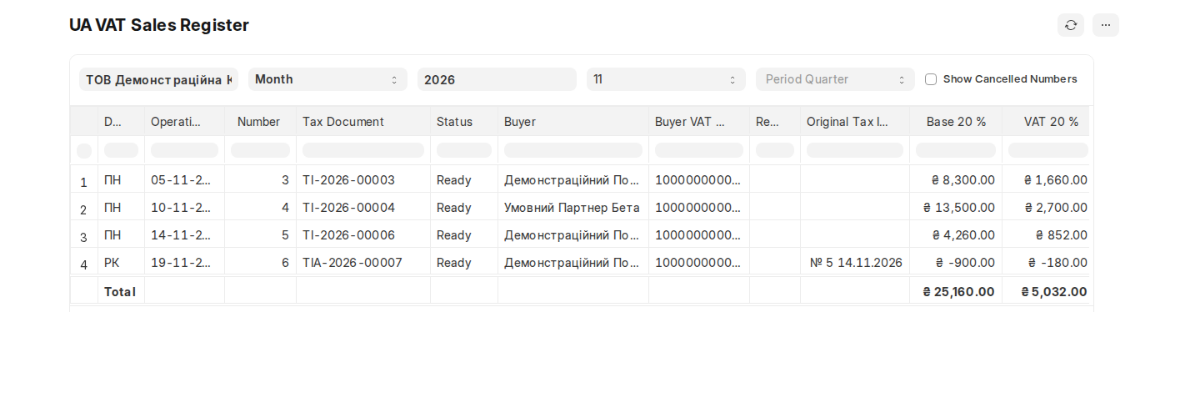
| UA VAT Sales Register | a row for every tax invoice and adjustment calculation in the state "Ready": the number, the date, the buyer, the ІПН, the base and the VAT at the rates 20, 7 and 14 %, the status and the SHA-256 of the XML file |
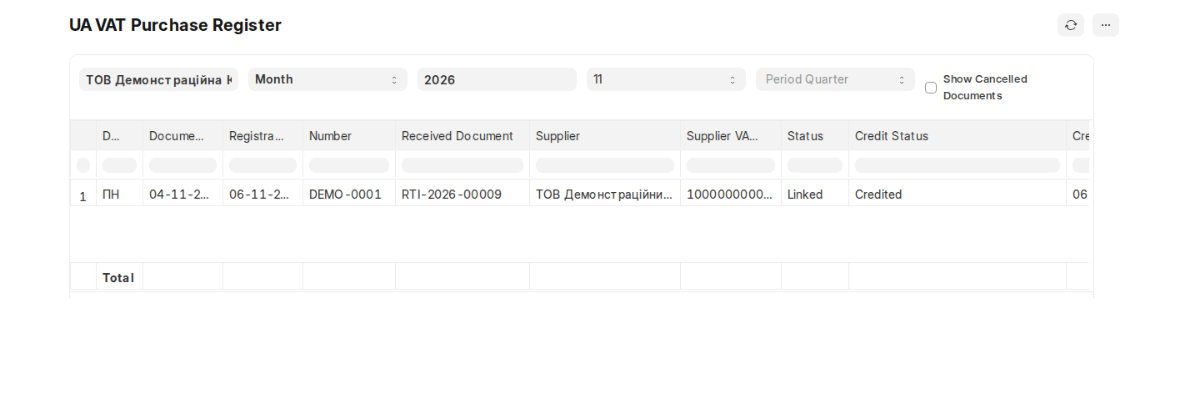
| UA VAT Purchase Register | a row for every received invoice or customs declaration in the state "Registered" or "Linked": the kind, the dates, the number, the supplier, the ІПН, the credit status, the credit date, the base, the VAT, the credited VAT, the VAT to the cost, the Purchase Invoices, the deadline; a total row |
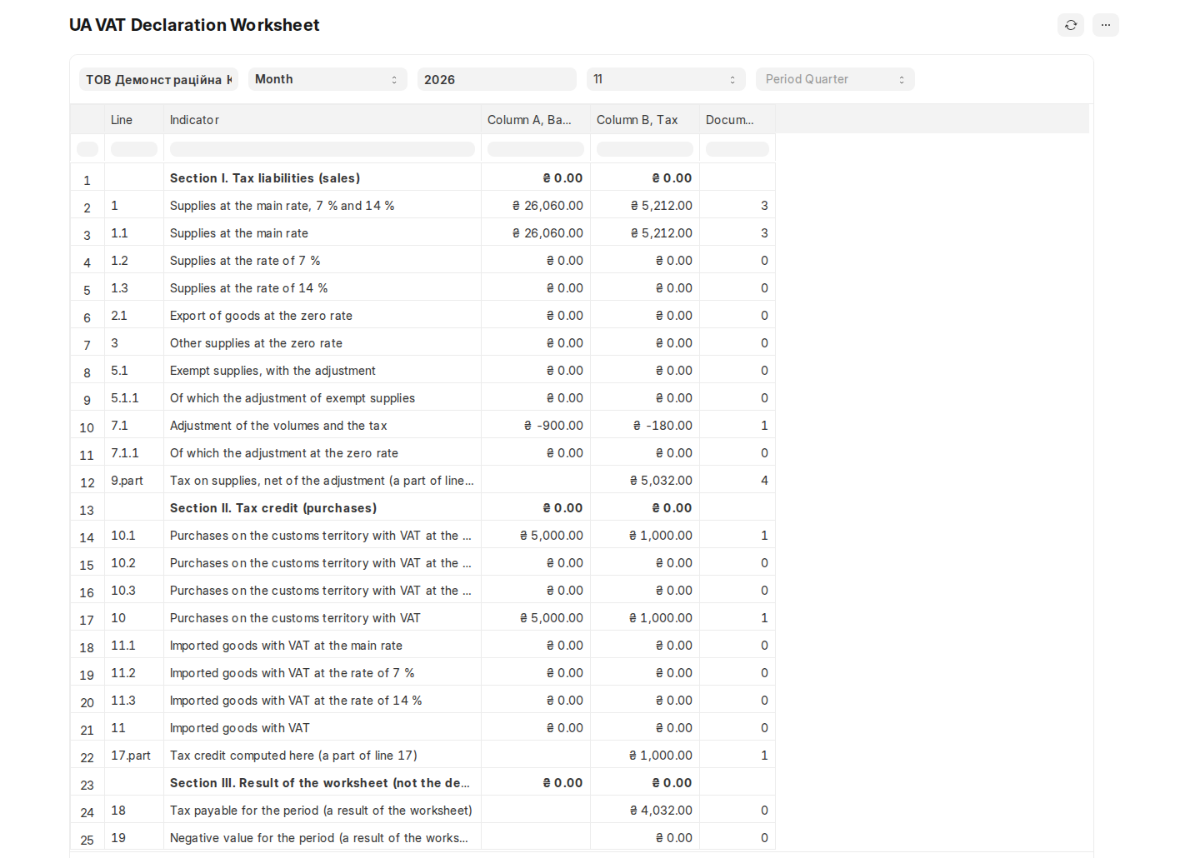
| UA VAT Declaration Worksheet | the rows of the declaration of order No. 21 that the ready documents allow to compute, in whole hryvnias |
All three reports have a period filter (a month, a quarter or a year) and the company, a Ukrainian print layout and the standard XLSX export. The registers have a switch to show cancelled numbers or documents; a cancelled document is shown without amounts. The reports are open to the roles Accounts User, Accounts Manager and Auditor, with the permission check of the company. The XLSX export is open to the roles Accounts Manager, System Manager and Auditor.
The sales register takes the documents whose operation date is in the period. The purchase register dates a document by the credit date: for a linked document it is the date of the confirmation entry, for any other the registration date (for a customs declaration its date). The credit status: credited; credited in part; not credited (the VAT is in the cost); not credited (confirmed after the 365-day term); not credited yet (not linked to a Purchase Invoice); not credited (the 365-day term has passed); cancelled.
The worksheet
The worksheet helps check the totals against the declaration of order No. 21; the declaration is filled in and filed outside the app.
The amounts are in whole hryvnias. Each month is rounded on its own, and a quarter or a year is the sum of the rounded months. Documents in the state "Ready" (sales) and linked documents (purchases) are counted.
Section I. Tax liabilities (sales)
| Row | Holds | From |
|---|---|---|
| 1.1, 1.2, 1.3, 1 | supplies at the main rate, 7 %, 14 % and their sum | tax invoices with the codes 20, 7, 14 |
| 2.1 | export of goods at the zero rate | tax invoices with the code 901 |
| 3 | other supplies at the zero rate | tax invoices with the code 902 |
| 5.1, 5.1.1 | exempt supplies with the adjustment, and of which the adjustment | tax invoices and РК with the code 903; РК with the code 903 |
| 7.1, 7.1.1 | the adjustment of the volumes and the tax, and of which at the zero rate | РК with the codes 20, 7, 14, 901, 902; with the codes 901 and 902 |
| 9.part | the tax of the rows 1.1-1.3 and 7.1 | a part of the row 9 |
An РК that reduces the base carries negative amounts and reduces the base and the tax of the row 7.1.
Section II. Tax credit (purchases)
| Row | Holds | From |
|---|---|---|
| 10.1, 10.2, 10.3, 10 | purchases with VAT at the rates 20, 7, 14 % and their sum | received tax invoices with the codes 20, 7, 14, linked |
| 11.1, 11.2, 11.3, 11 | imports with VAT at the rates 20, 7, 14 % and their sum | customs declarations with the codes 20, 7, 14, linked |
| 17.part | the tax of the rows 10 and 11 | a part of the row 17 |
The credit of a document is what the entry of its link confirmed, to the kopeck; the month of the credit is the month of the entry. A purchase with no right to the credit has a zero credit, mixed use gives the share of the company, and the credit counted is the one confirmed by the 365th day from the date of the invoice at the latest.
Section III. Result of the worksheet
| Row | Holds |
|---|---|
| 18 | the row 9.part minus the row 17.part, when the difference is positive |
| 19 | the row 17.part minus the row 9.part, when the difference is negative, shown as a positive number |
This is the difference of two computed sums: the rows 9.part and 17.part. It helps check the totals against the declaration.
Warnings of the reports
The first period of a payer runs to the end of the first full calendar month after the registration; when the registration is not on the 1st, the worksheet shows a warning for the month after the month of the registration. The reports warn when the company is not marked as a VAT payer, when the period starts before the registration or ends after the deregistration, and about the received documents of the period that are not linked to a Purchase Invoice, whose term has passed or that were confirmed after the term.
Basis
The order of the Ministry of Finance of 28.01.2016 No. 21 (the procedure of filling in the VAT declaration). The Tax Code, article 198.6.