Delivery note (видаткова накладна)
Who it is for: an accountant, a storekeeper, a sales manager. Result: a Ukrainian delivery note (видаткова накладна) is printed from a Delivery Note or a Sales Invoice.
Note: The final decision rests with the enterprise's accountant.
The form comes from the app ua_documents; it takes the amount in words, the date and the company name with its legal form from ua_localization.
How to print
- Open a Delivery Note or a Sales Invoice.
- Choose "Print" and the format:
UA Vydatkova Nakladna Delivery Notefor a Delivery Note;UA Vydatkova Nakladna Sales Invoicefor a Sales Invoice (it is meant for an invoice that updates stock, but any Sales Invoice can be printed with it; for services use the act of works).
The format names in the print dialog are English because Frappe shows the value of the "Print Format" field as it is; the Ukrainian title "Видаткова накладна" is printed in the form itself.
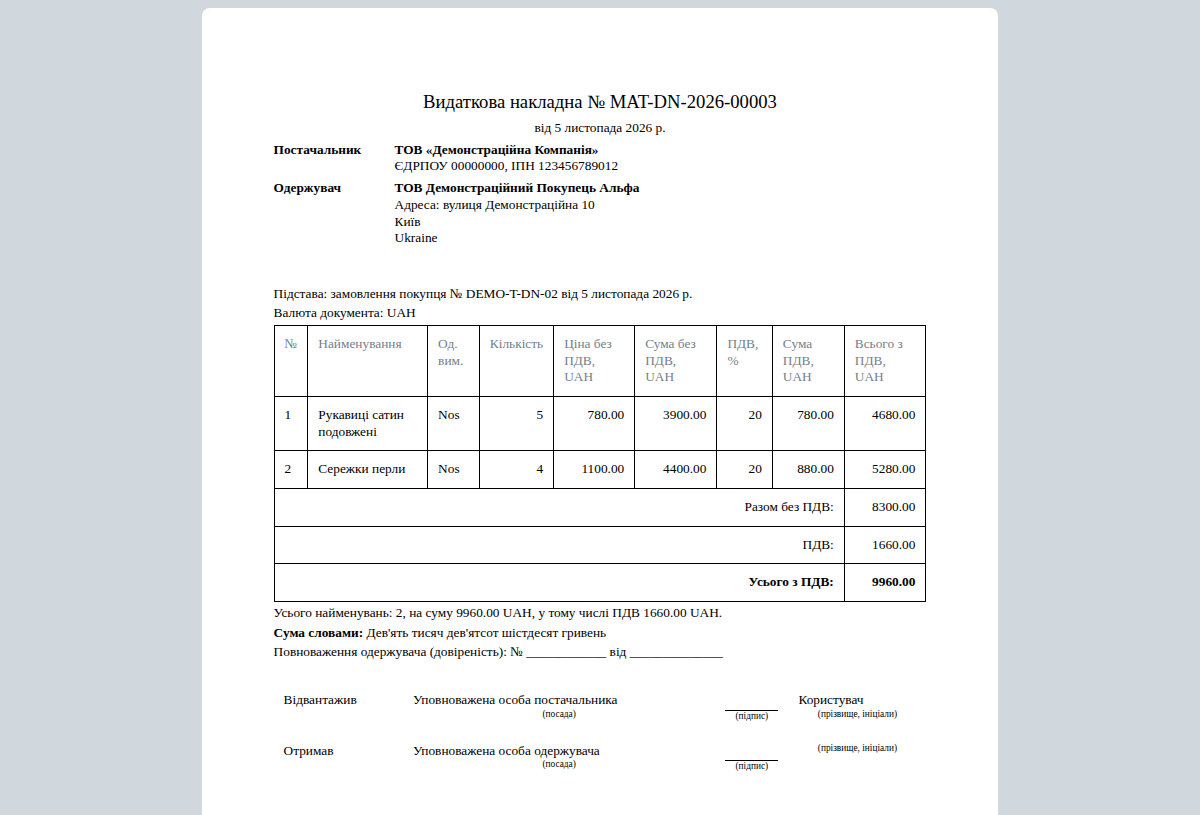
What is printed
- A title with the document number (from the naming series) and the posting date.
- The supplier: the company name with its legal form, the ЄДРПОУ and the VAT number from the company requisites (as a fallback, the tax ID of the Sales Invoice or of the Company).
- The receiver: the customer name, its tax ID (from the document, else from the Customer record) and the address.
- The delivery address and the basis (the customer's order number and date,
po_noandpo_date) when they are set. - The currency and, for a document not in the company currency, the rate.
- A table of lines: price and amount without VAT and, for a document with VAT, the rate, the VAT and the total of a line.
- The totals of the document and the amount in words.
- A line for the power of attorney of the receiver and two signatures: "Відвантажив" and "Отримав".
How VAT is counted
- A tax row is VAT when the word "ПДВ", "VAT" or "НДС" is in its description or its account name. Name the VAT accounts accordingly.
- Other taxes with an amount (a customs fee, for example) are printed as their own line under the totals, so that the lines plus the taxes give the total.
- The rate of a line comes from the item-wise tax data of ERPNext; a line with a zero rate prints 0.
- For a document without VAT the form prints "Без ПДВ.".
- The totals are those of the document. ERPNext computes the VAT total on the tax rows and the VAT of a line on the items, so the sum of the VAT of the lines can differ from the total by a kopeck or more; the form does not hide the difference.
- The amount in words comes from the rounded total when the document has one, otherwise from the grand total, in the currency of the document. ERPNext rounds the total of a document by default (1234.50 becomes 1234.00): the form then prints "Заокруглення" and "До сплати".
- A return is marked "(повернення)" and prints negative values and "мінус" in the amount in words.
Print details
- The positions of the signatories are fixed texts ("Уповноважена особа постачальника", "Уповноважена особа одержувача"); the supplier's name is the full name of the user who made the document, the receiver's name is the contact of the document (empty when there is none).
- When both the ЄДРПОУ and the VAT number are set and differ, both are printed, and when they are equal only the VAT number is printed; the РНОКПП of a FOP without a VAT number is printed under the caption "ЄДРПОУ".
Related: Payment invoice, Act of works, Incoming waybill, Ukrainian terms.