Adjustment calculation of a tax invoice
Who it is for: the accountant of a VAT payer. Result: an adjustment calculation (РК) to a tax invoice, prepared for filing, with a number and an XML file.
Note: The final decision rests with the enterprise's accountant.
When an РК is needed
An adjustment calculation is made when the compensation for a supply changed after the tax invoice: a return of goods, a revision of the price, a return of an advance, a correction of an error. The app makes a draft РК:
- from a credit note (a Sales Invoice marked as a return): submit it and press "Create" > "Adjustment Calculation";
- from a change of the price of a row of an invoice that is already ready: a function (
make_price_adjustment) for a script or a console serves for it.
The РК is built against the invoice that holds the supply. The rules:
- The РК is made against an invoice in the state "Ready"; an invoice that is still a draft is changed directly.
- The returned lines are matched to the rows of the original as the earlier РК left them: the same name and rate, the closest price within a kopeck. A line that matches nothing, a return at another price and a return of more than was supplied are reported as errors.
- The buyer registers the РК when the compensation decreases and he is a VAT payer; otherwise the seller registers it. An РК that the buyer registers to a buyer "Неплатник" is refused.
- The registration deadline is 1095 calendar days from the date of the invoice at the latest (article 192.1): later than that the app refuses the calculation, both at creation and at "Mark Ready". When the buyer was not a payer on the date of the supply, the liability decreases and a row has the reason code 101 or 104 (a price revision), a warning comment under article 192.2 is added to the draft: the liability of the supplier is reduced only on a return of the goods with a full refund.
- One credit note can be spread over several invoices; when the source already has an РК, the app reports it.

The correction groups
A row that is corrected is written with a minus sign in every column, and the new row with the corrected values has a new number; both share one correction group number and one reason code, which the app writes.
| Code the app writes | Case | Rows of the group |
|---|---|---|
| 103 | a row returned in full | one row with the quantity and the amounts negated |
| 102 | only the quantity changes | a take-off row (minus) and a replacement row with the new quantity at the same price |
| 101 | only the price changes | a take-off row and a replacement row with the same quantity and the new price |
| 104 | the quantity and the price change | a take-off row and a replacement row with both new values |
The groups are checked at "Mark Ready": the shape of the group, the take-off of the whole row, a non-negative balance per rate, and one РК per corrected row. When the check fails, the number stays free. The same check can be run on a draft.
For a row with goods that the original does not hold, the reason code is taken from the field "Reason Code for New Goods" of UA VAT Settings.
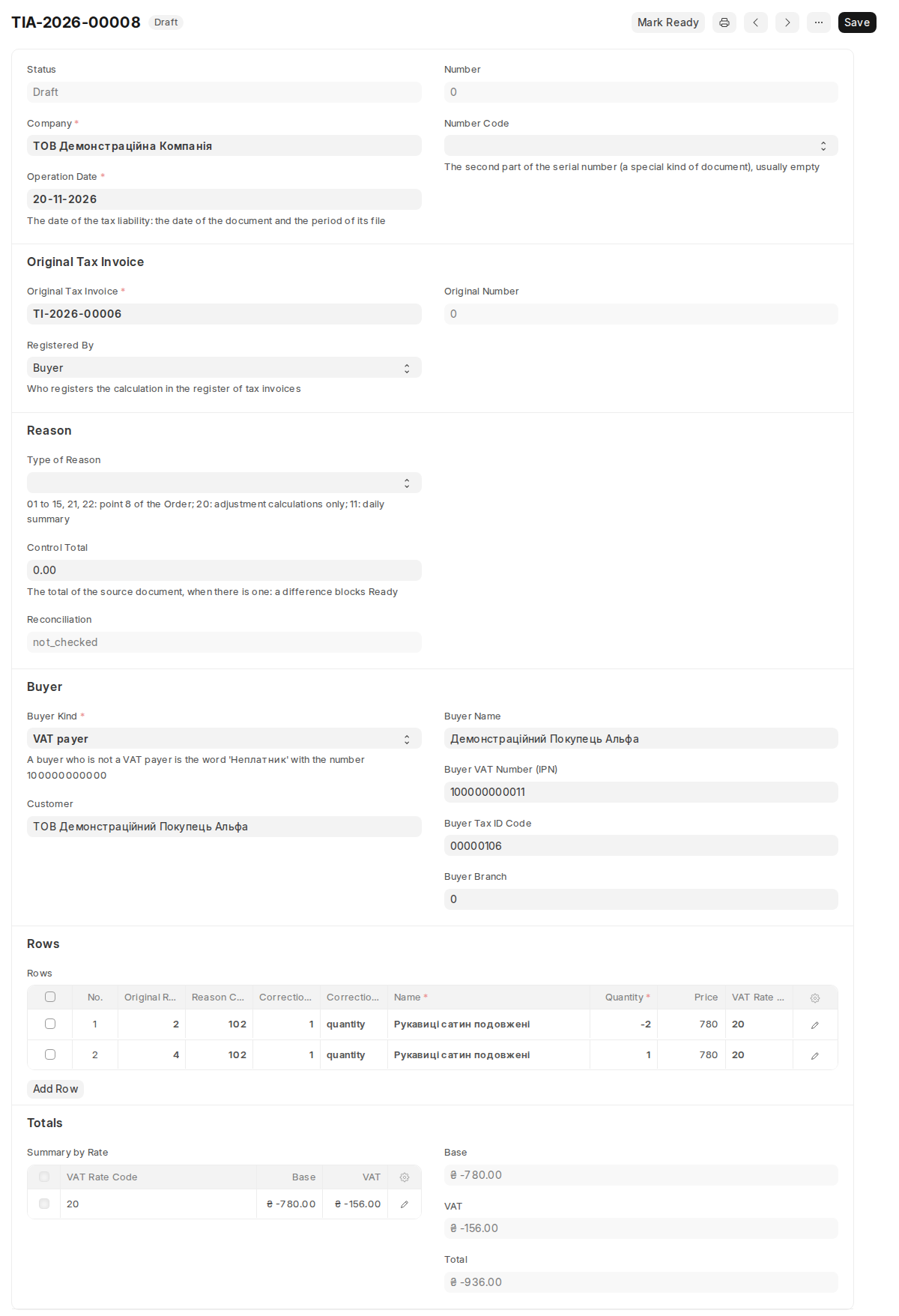
Prepare for filing, numbering, cancellation
All as in Tax invoice: the buttons "Mark Ready", "Download Unsigned XML" and "Cancel Document" (Accounts Manager), one counter of numbers for the invoices and the РК of a company, the document is immutable after Ready. The form of the РК is J1201216 (F1201216 for an individual entrepreneur). A tax invoice that has a live РК is cancelled after the РК is cancelled. The app prepares the РК and the XML file up to the state "Ready"; signing and submission are done outside the app.
Basis
The Tax Code, article 192 (the deadline and the registering party). The form of the correction rows: the Procedure of filling in a tax invoice (order of the Ministry of Finance of 31.12.2015 No. 1307), points 21-23.