NBU exchange rates
Who it is for: an administrator, an accountant. Result: currency rates to the hryvnia are stored in ERPNext from the official NBU data without manual entry.
What the job does
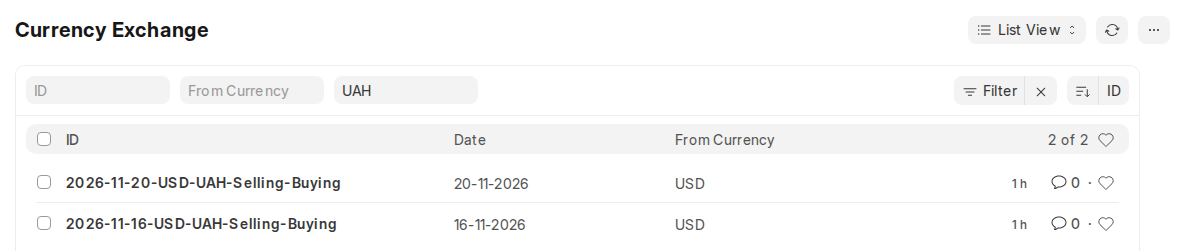
Once an hour the job reads the official rates of the National Bank of Ukraine and writes a row to the "Currency Exchange" list only when a rate has changed. While the job is off it returns at once and does nothing.
A rate is written as "foreign currency → UAH", for buying and for selling, with the date of the NBU rate. The row name is made of the date and the pair of currencies, so there is one row per currency and day.
How to switch it on
- Open "UA Localization Settings". A user with the System Manager role can change them, Accounts Manager can read them.
- In the block "NBU Exchange Rates" tick "Fetch NBU Exchange Rates" (off by default).
- In "NBU Currencies" enter currency codes separated by commas, for example
USD, EUR. When the field is empty, every enabled currency except UAH is taken. Codes that the NBU does not publish are skipped without an error.
To switch the job off, clear the tick. Switching it on at a site is a separate action of the administrator.
How the app decides whether to write a row
The rate is compared, to the precision of the field (9 places), with the row in force on the day of the reply: the latest row of that currency to UAH that is marked for both buying and selling and has a date not after the day of the reply.
| Situation | What the job does |
|---|---|
| There is no row | adds a row |
| The rate is the same | does nothing: the earlier row is still in force |
| Another rate on the same day | updates that row (a correction), not a second row |
| Another rate on a later day | adds a row for that day |
An update of the same day overwrites any row of that currency and day that is marked for both buying and selling, also one entered by hand. Rows for buying only or for selling only that a user made are never touched.
The rate in force may be published by the NBU a day ahead.
Network and errors
The only network access of the app is one GET request to the open data of the NBU (bank.gov.ua) with a timeout, a size limit of the reply, no redirects and no credentials. Any other address is refused in the code.
Errors never reach the scheduler. An empty reply, a reply that is not JSON, a reply without rates, an HTTP status other than 200, a timeout and a connection error are written to the Error Log with the title "NBU exchange rates" and the job ends; an hour later it tries again. One unusable item of a reply is skipped and the others are kept; a rate that cannot be saved is rolled back and logged, and the other currencies go on. The result of the job can be seen in the "Currency Exchange" list and in the Error Log.
Rates in documents
- When "Allow Stale Exchange Rates" of Accounts Settings is off, a rate that does not change for longer than "Stale Days" is not found by ERPNext, which falls back to its own external provider; by default stale rates are allowed.
Related: Taxpayer requisites.