Chess sheet, main book, account card and other ledger reports
Who it is for: an accountant. Result: you know what each of the five reports of the ledger shows, which filters it has and how the data is read.
Note: The final decision rests with the enterprise's accountant.
All the reports are in the module "UA Documents", for the roles Accounts User, Accounts Manager and Auditor.
Shared rules
- The ledger is read as in the General Ledger report: the non-cancelled entries of the company; the finance book rule (entries of no book and of the book of the filter or the default book of the company); the user permissions apply to the entries, and the company of the filter is checked by the standard check. A user restricted to a company, an account or a dimension sees the data within that restriction.
- Opening entries (
is_opening) go into the opening balance, unless Accounts Settings ignores that flag for reports. - Amounts are in the company currency; an account in another currency is also shown in its own.
- Corresponding accounts. A ledger entry has one side only, so the debit-credit pairs are made inside a document by one rule: the debit lines are paired with the credit lines in the order of the lines of the document, to the cent. Each line of an entry counts on its own, also when two lines of one account stand on opposite sides, so the total equals the turnover of the ledger. For a document with several debits and several credits the split follows this pairing order; a pair that cannot be made (a dimension filter left one side of a document) is shown on the line "No corresponding account".
- Print and PDF use the layout of the report in the browser; the page orientation is chosen by the user in the print dialog (a wide matrix is best printed in landscape). Export to Excel is the flat table of the visible columns of the report.
- The entries of a Period Closing Voucher are ordinary rows of the period in these reports and belong to the turnover.
Chess sheet
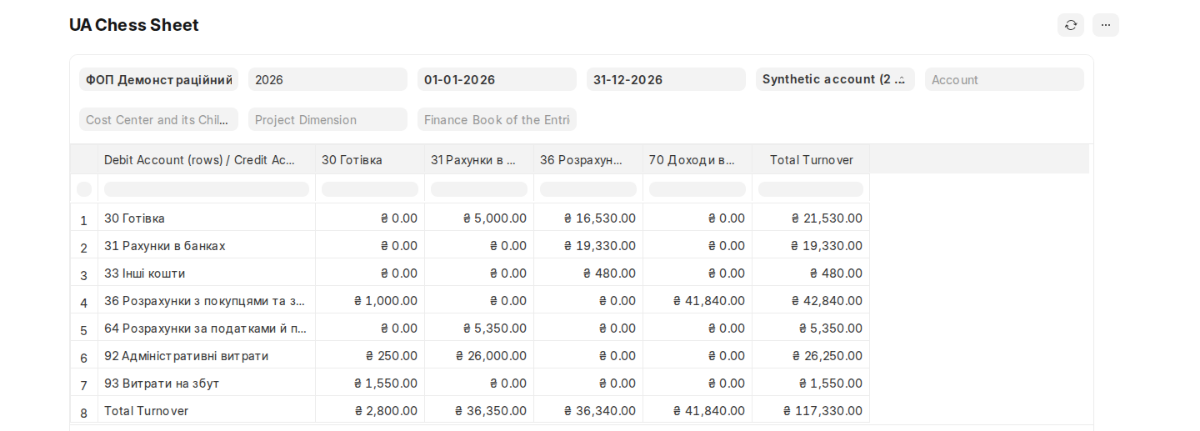
The report "UA Chess Sheet" ("Шахова відомість"). A matrix of the turnover of the ledger for a period: a row is a debit account, a column is a credit account, a cell is the amount debited to the row account in correspondence with the column account; totals both ways.
Filters: Company; "Fiscal Year of the Period" (gives the period, which must lie within it), From Date, To Date; "Aggregation Level" (Account as in the ledger; "Subaccount (3 digits)"; "Synthetic account (2 digits)", synthetic by default); Account (an account or a group: the correspondences that have it on either side); "Cost Center and its Children"; "Project Dimension"; "Finance Book of the Entries"; all accounting dimensions.
The cells are made between ledger accounts and then added up to the chosen level, so a transfer 301 to 302 is a diagonal cell of the synthetic account 30.
Main book
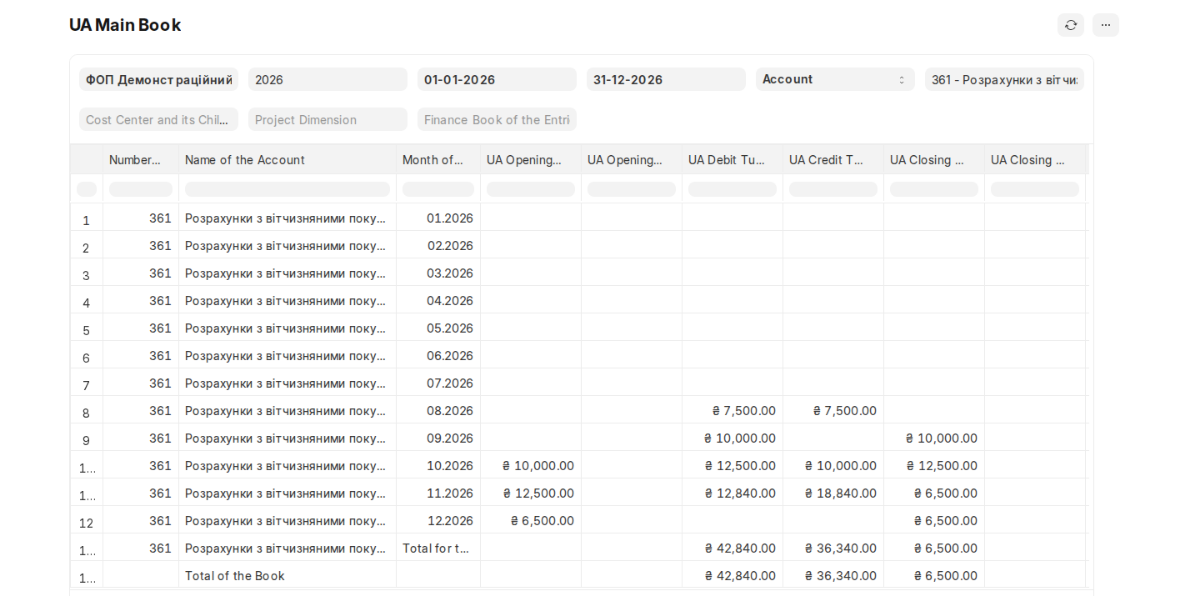
The report "UA Main Book" ("Головна книга"). For every account (or group, at a coarser level), by calendar month of the period: the opening balance, the debit turnover, the credit turnover and the closing balance; a total row per account and a total row of the book.
- The filters are those of the chess sheet; the default level is "Account".
- A month without movement shows the carried balance; the first and the last month may be partial.
- The balances are one-sided (debit or credit; a zero is an empty cell). At a coarser level the balance of the group is shown, as in the trial balance.
- An account is listed when it has an opening balance or an entry in the period.
- An account in another currency (all accounts of the group in one currency) also has the opening balance, the turnovers and the closing balance in its currency, signed debit minus credit.
- The total of the book: the sums of the one-sided balances and of the turnovers; the two sides are equal for a complete ledger.
Account card
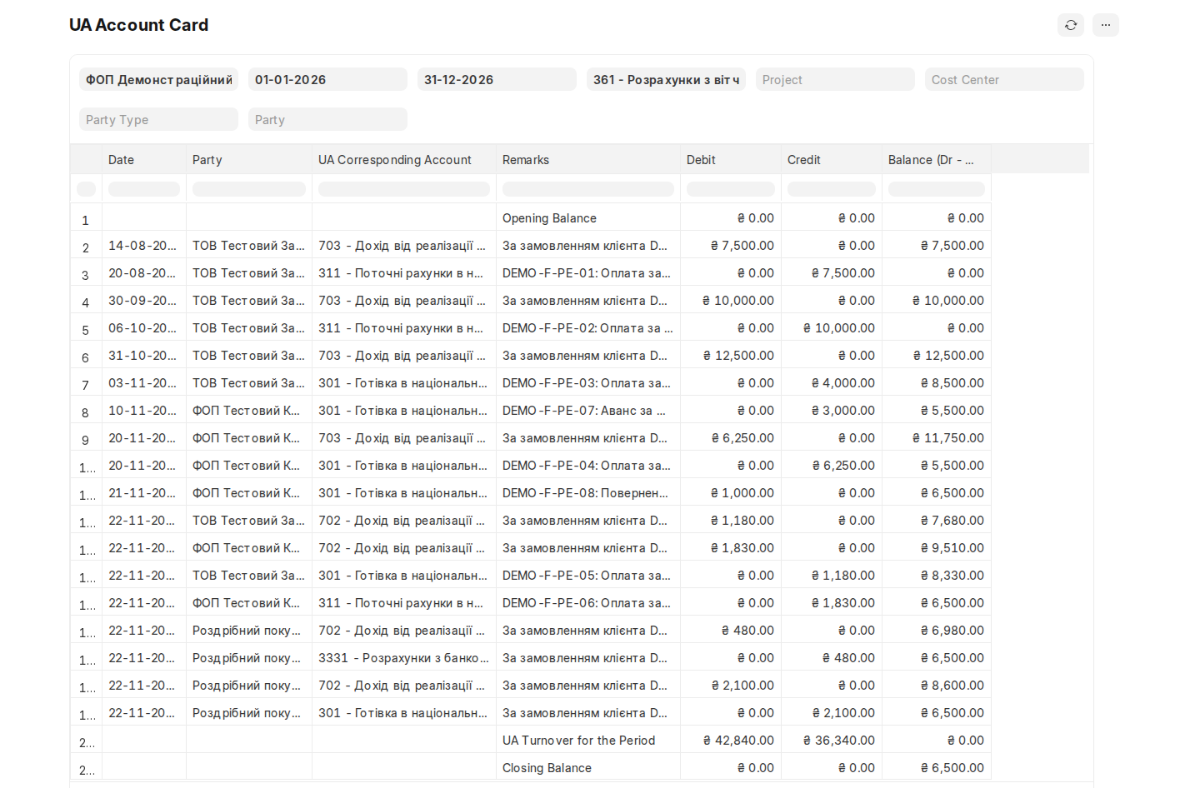
The report "UA Account Card" ("Картка рахунку"). The General Ledger of one account: the opening balance, the entries of the period with the corresponding account and the running balance, the turnovers and the closing balance.
- Filters: Company, From Date, To Date, Account (required; a group account takes its sub-accounts, as the General Ledger does), Party Type and Party, the cost center, the project and every accounting dimension.
- A dimension filter restricts the entries of the account.
- The opening balance is the entries before From Date and the opening entries of the period. The card shows the entries up to To Date inclusive.
- The rows of the opening balance, the turnover and the closing balance have their text in the "Remarks" column; a period without entries gives these three rows.
- An account in another currency also has a balance in its own currency.
- The card runs over any dates From Date and To Date.
- The print has the name, the period and the name of the user who prints it ("Report Prepared By").
Analysis by subconto
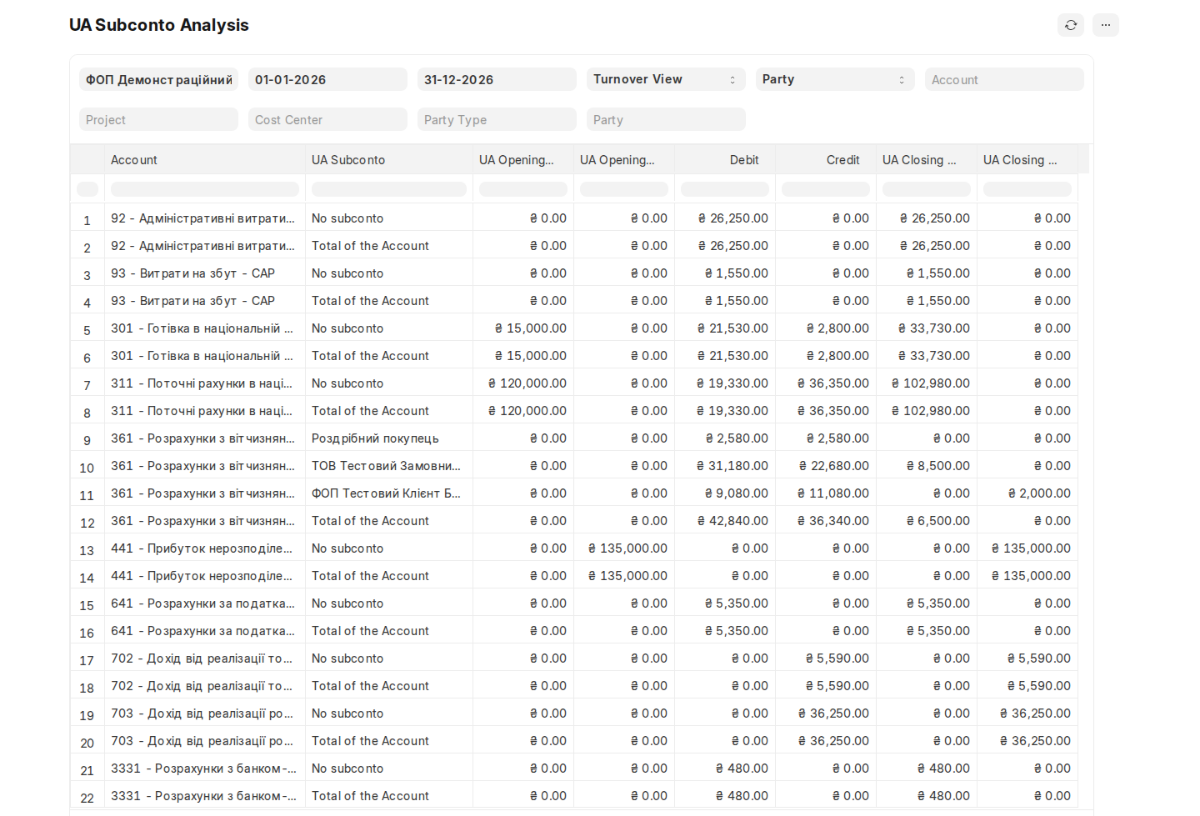
The report "UA Subconto Analysis" ("Аналіз, обороти та картка по субконто"): here the subconto is an ERPNext accounting dimension.
- Two views, the filter "Report View": "Turnover View" — the turnovers of the accounts by subconto (opening balance, turnover, closing balance, each balance on its debit or credit side, a subtotal row per account; an entry without a value falls into the group "No subconto") — and "Card View" — the card of every account and subconto with the corresponding accounts and the running balance.
- The subconto ("UA Subconto"): the party, the cost center, the project or any enabled accounting dimension. Party types are kept apart: a customer and a supplier of the same name are two values.
- Filters: Company, From Date, To Date, Report View, Subconto, Account (optional, with its sub-accounts), Party Type, Party and the dimensions of the General Ledger.
- One subconto per run. For several subconto the report is run several times. Any subconto can be chosen for any account.
- Tree values. The values of a tree dimension are shown as they are recorded in the entries: the value of a parent is shown apart from its children.
- Entries without a value. Entries posted before the dimension was created fall into "No subconto"; an entry gets the value of a dimension from the document that copies it.
Consolidated entries
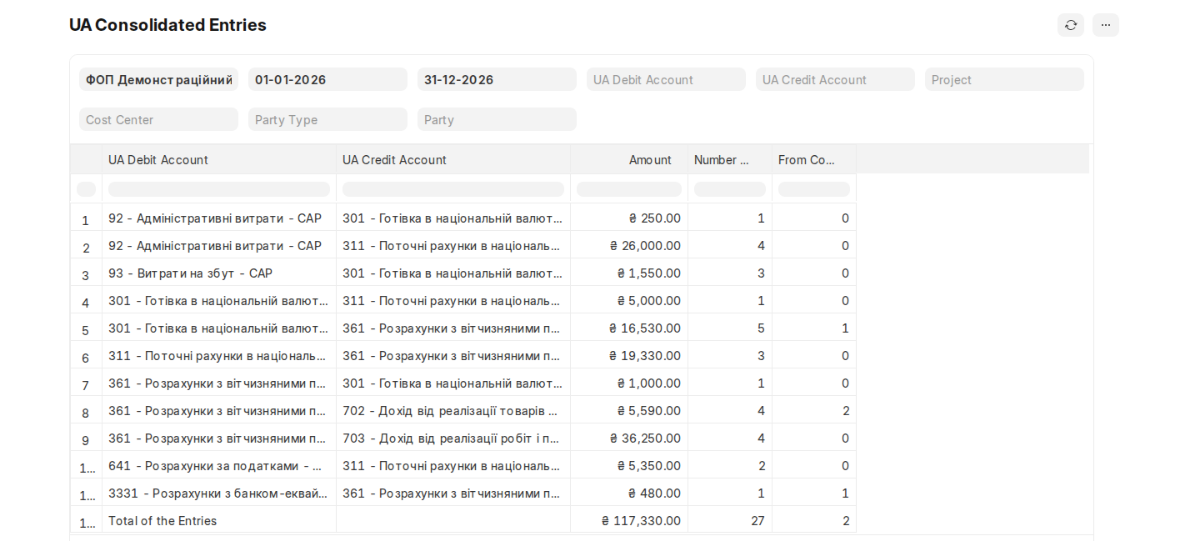
The report "UA Consolidated Entries" ("Зведені проводки"). The entries of a period grouped by the pair of corresponding accounts: the debit account, the credit account, the amount, the number of documents and the number of compound documents (several debits against several credits). The last row is the total.
- A document of ERPNext posts lines, and the debit-credit pairs come from the pairing rule described above.
- Filters: Company, From Date, To Date, "UA Debit Account" and "UA Credit Account" (several allowed, a group takes its sub-accounts), Party Type, Party and the dimensions. A pair is kept when its debit line or its credit line has the filtered value, because a dimension is often set on one side only.
- The report takes the non-cancelled entries of the ledger in the period; the pairs are built from the entries of the period; entries flagged as opening belong to the opening balance of the other reports (unless Accounts Settings ignores the flag), and the entries of a Period Closing Voucher belong to the turnover.
- A document that has several pairs on the same two accounts counts once in "Number of Documents". "From Compound Entries" counts the documents with a many-to-many entry (several debits against several credits), whose pairs are made in the order of the lines.
Related: Trial balance, Cash book, Reconciliation act.