Returns, service receipts and the X-report in the ERP-CRM PRRO
ua_prro is an ERPNext app for the Ukrainian software cash register (PRRO). This article describes its second stage: returns with a return receipt, a service deposit and withdrawal of cash, and the X-report. Receipts are produced by a simulator of the fiscal server; they are not registered with the tax service.
What was added
The first stage issued a sale receipt from a Sales Invoice. Now a PRRO Cashier can:
- take a sale back with a return invoice, which is fiscalized by the same button "Fiscalize" and gives a document of the kind Return (a return receipt), in full or in part;
- put cash into the till and take it out with a service receipt: the buttons "Service Deposit" and "Service Withdrawal" on the own open shift;
- print the X-report of an open shift without closing it.
The Z-report now counts return receipts and service receipts.
Returns
The cashier opens the Sales Invoice with an accepted receipt and makes a return. On the first save for a POS invoice the flag "Fiscalize (PRRO)" is switched on by itself when the receipt of the original is accepted; the cashier may clear it, and then no return receipt is issued and the sale stays registered. The app takes the fiscal number of the original receipt from the accepted document of the sale and writes it into the return receipt. Then the cashier submits the invoice and presses "Fiscalize".
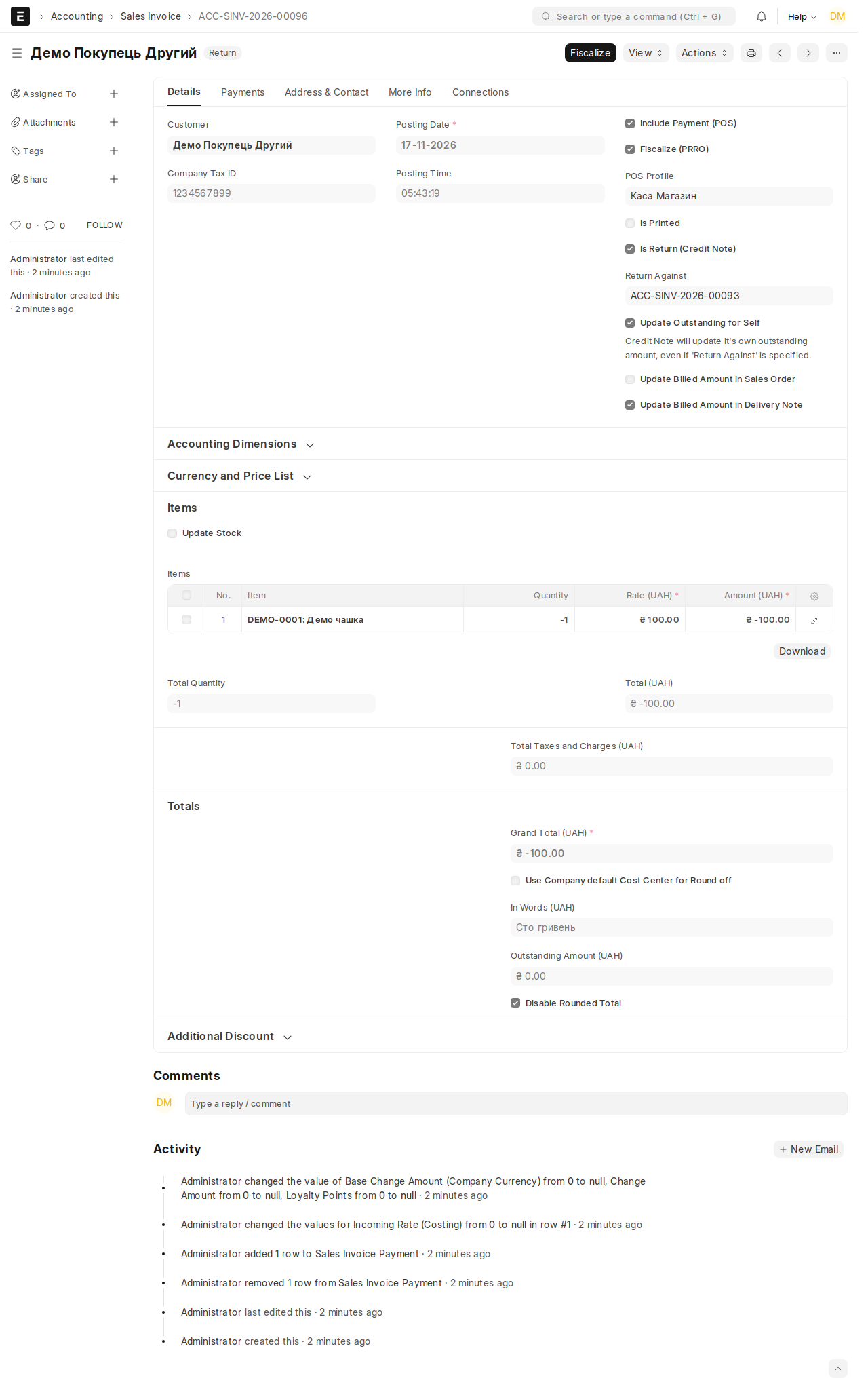
In a partial return only the rows and quantities that are returned are kept. The app makes sure that the returned quantity of an item does not exceed what was sold minus the earlier returns. Pressing "Fiscalize" again returns the same document, and two returns of one sale are handled one after the other.
A cash return is rounded by the same rule as a sale, and the customer is paid back the rounded total. A card return is a transaction of its own at the terminal, so the terminal data of the sale are not copied, and the return receipt is made without terminal data.
When the receipt of a sale was made before the move to ERP-CRM and the system has no PRRO Document for it, the return invoice shows the field "Original receipt fiscal number". A PRRO Manager normally fills it, and the app checks the format. The field holds the fiscal number of the sale receipt; the bank RRN of a terminal transaction is a separate notion. A return receipt is made for an invoice with one payment row.
The return of a sale with a discount on the total is the whole sale with the same discount: the discount is distributed across the lines of the receipt as for a sale. The app refuses a partial return of such a sale, a return that drops the discount of the sale and a return with a discount that the sale did not have.
Service deposit and withdrawal
The cashier presses "Service Deposit" or "Service Withdrawal" on the own open shift, enters the amount and, if needed, the reason, and presses "Continue". The app shows the amount that goes into the receipt. It is always rounded to 0.1 UAH (1234.56 gives 1234.60, and 1234.54 gives 1234.50), and this does not depend on the 0.50 UAH step of sales. The receipt goes out only with the confirmed amount, and an amount that rounds to zero is refused.
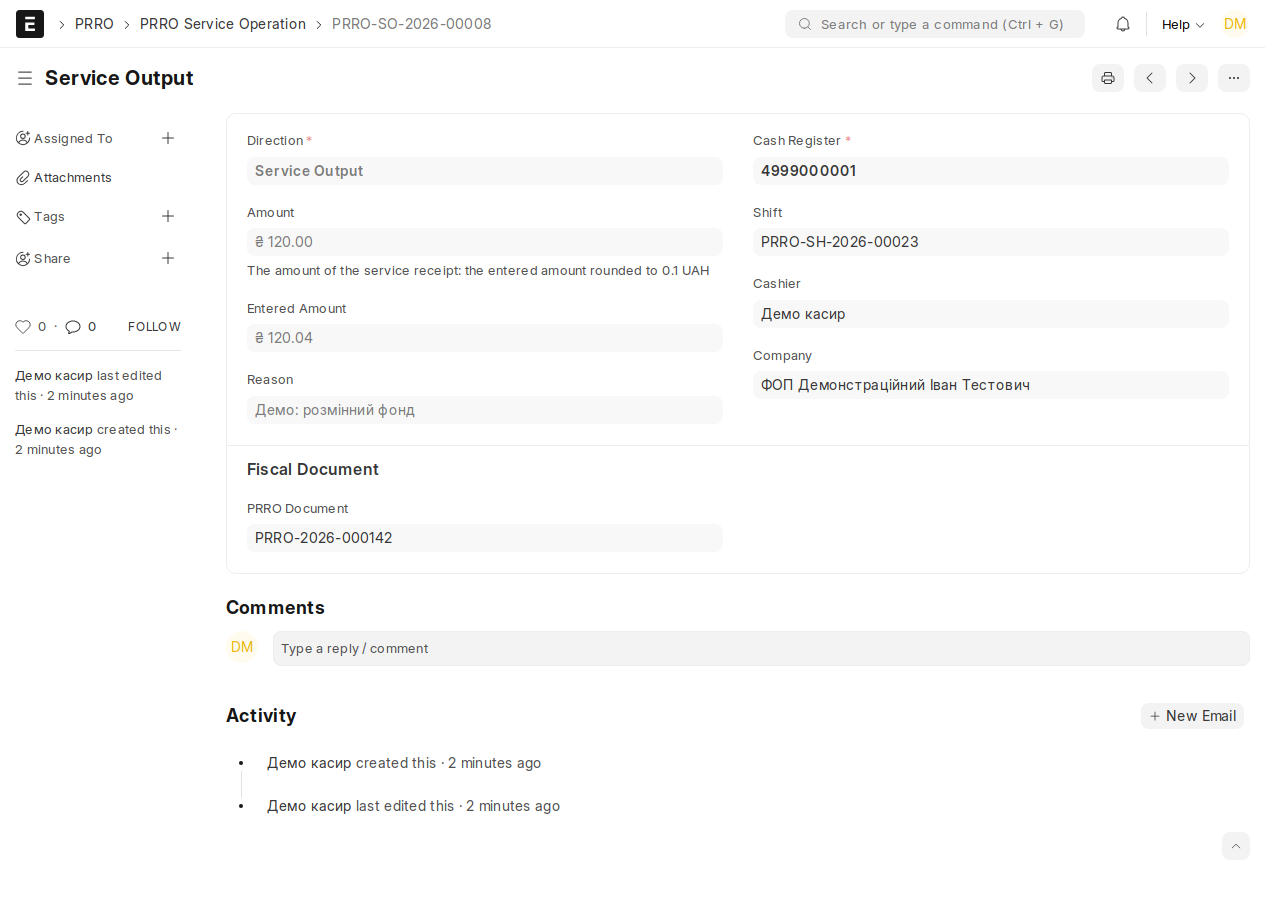
Each service receipt makes a PRRO Document and a PRRO Service Operation record. The buttons come with the role PRRO Cashier.
The X-report
The X-report is a non-fiscal print of the totals of an open shift: sales, returns, service deposits and withdrawals, and the cash now. The app reads the counters of the fiscal server (here the simulator) and compares them with the sums of the accepted documents of the shift; the differences are shown on the screen. A cashier prints the X-report of the own shift, and a PRRO Manager that of any open shift of the company. The X-report is built from the current counters of the open shift.
What came next
- Automatic fiscalization of sales and returns in POS Next for a POS Profile that has it on: Sell in POS Next.
- The discount on the total, which the app distributes across the lines of the receipt, for a sale and for a return.
- The report of unfiscalized invoices: Unfiscalized flagged invoices.
What this means
Returns, service receipts and the X-report run from the start to the print: a return receipt with the number of the original, a service deposit and withdrawal with a rounded amount, an X-report with a comparison of the counters. The discount of a sale goes into the return together with the sale.
More in the documentation: Returns and the return receipt, Service deposit and withdrawal and X-report.